

Offboard a leaver
Every leaver has a clear last two weeks, their manager has a handover checklist, IT gets the access ticket a week ahead, and the person hears from you once after they have gone, all from one automation on the termination date. For: admins and owners. Time: about 45 minutes.
What you’ll need
Section titled “What you’ll need”- Termination Date synced; the Off-boarding trigger runs on it. In a Workday report it is the
Termination_DateorTerm_Datecolumn; see HRIS fields and Workday. - Personal Email Address synced for the post-exit note (
Home_Email_Addressin a Workday report). - An email sender; see Add an email sender.
- For the IT ticket, Jira connected with your IT project ticked Available to steps, for a Raise Ticket step where enabled for your workspace; see Jira. Otherwise a verified custom email recipient for IT’s queue, where enabled for your workspace; see Add a custom email recipient.
- Optional: a leaver FAQ in Library > Content, and an exit survey form.
Build it
Section titled “Build it”-
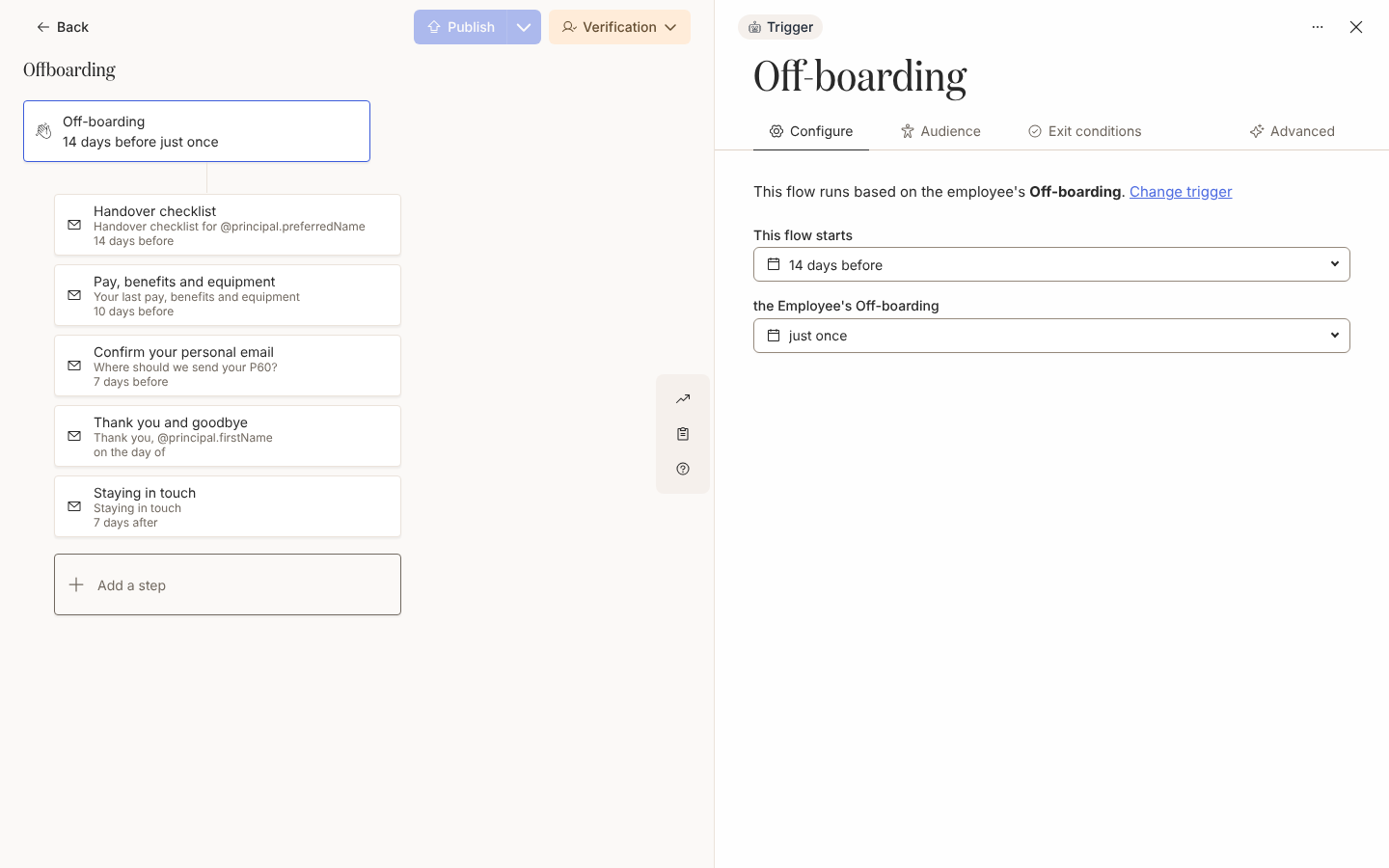
Create an automation with the Off-boarding trigger under Employee Lifecycle and change This flow starts from the day before to 2 weeks before; the termination date stays the reference date; see Configure a date trigger.
-
Keep Lifecycle at Current, because the audience is checked when the flow starts, two weeks before the last day; see Set the audience for an automation.
-
Add a Send Email to Employee step with To set to Manager, 2 weeks before, carrying the handover checklist, a Link Button with Track Action ticked and a reminder 2 days after send; see Choose recipients and Cc, Add a button to a message and Add reminders.
-
Add three steps to Employee: 10 days before on pay, benefits and equipment, 1 week before to confirm their personal email, and on the day of to say goodbye; see Schedule a step.
-
Add a Raise Ticket step, where enabled for your workspace, 1 week before, with your IT project and issue type and a summary such as
Remove access for @principal.name; a ticket offersprincipaltokens only, so the date is the step’s schedule, not a token; see Raise a ticket. -
Add a Send Email to Employee step 1 week after with To set to Employee (Personal), and on its Audience tab add Terminated to the lifecycle; see Set a step audience.
-
Turn on Skip if overdue at enrollment on the manager’s step and the 10-day step so a same-day exit does not send them; see Handle late enrollments.
-
Publish, set the mode to Verification and review the first departures in Needs Review before moving to Automated; see Publish an automation and Change the mode of an automation.
Variations
Section titled “Variations”Before the last day, the manager’s checklist and the leaver’s messages work as Send Direct Message steps; see Add a direct message step. A Slack account is often deactivated on the last day and an unmatched recipient gets a Bounced delivery, so keep the post-exit note as an email to Employee (Personal).
Keep every step as Send Email to Employee and set From to your People team’s mailbox, as in Choose a sender, so a reply about final pay reaches a person.
Without Jira, the IT step is a Send Email to Employee step 1 week before with the IT queue’s custom email recipient under To. For a departure handled by hand, the catalogue’s Employee resigns template has No trigger; enrol the person with Manual Enroll and Verify Mode; see Use a flow without a trigger.
Watch out for
Section titled “Watch out for”- Off-boarding is a date trigger on Termination Date; its default start, the day before, leaves no time for a handover; see Trigger catalogue.
- A Workday column with another name shows nothing under Fields in Report and nobody enrols; Pyn reads
Termination_DateorTerm_Date; see Workday. - A last day under two weeks away is a late enrollment: the steps already due send at once unless they have Skip if overdue at enrollment; see Handle late enrollments.
- The post-exit step needs Terminated on its own Audience tab, or it reads No recipient and is Skipped; a leaver with no personal email address is skipped there too; see Set a step audience.
- A ticket step has no To, so no issue is created if its step audience excludes the employee. Identify the leaver with
principal.nameandprincipal.email; see Raise a ticket and Tokens. - A withdrawn resignation does not stop the enrollment by itself; stop it in Activity; see Stop an enrollment.
- If Publish appears to do nothing, a step has no recipient; check each step’s To field. See Publish an automation.
Check it worked
Section titled “Check it worked”Two weeks before a termination date, the person appears under Enrollments with the termination date as Reference Date. In Verification it waits in Needs Review; see Review and unpause enrollments. Once unpaused, the manager’s email shows as delivered the same day, the ticket’s delivery links to the issue in Jira, and the post-exit email is scheduled a week after the last day at the personal address. Track actions shows whether the manager has used the checklist button.
Related
Section titled “Related”- Tutorial: offboarding flow for the same automation with the message copy.
- Configure a date trigger for the offset.
- Raise a ticket for the Jira step.
- Handle late enrollments for short-notice exits.