

Create a webhook
Some answers already exist in another system: a completed training in your LMS, an equipment request in a ticketing tool, a signed document. A webhook on a form lets that system post the answer into Pyn as a submission, recorded against the employee it names.
Before you start
Section titled “Before you start”- You are an Admin.
- The form is built and published, with field labels your other system can map to. See Build a form.
- The other system can send each employee’s id from your HRIS, the same id Pyn has from that integration.
-
In Pyn, open Flows in the left navigation, select Forms, then the form.
-
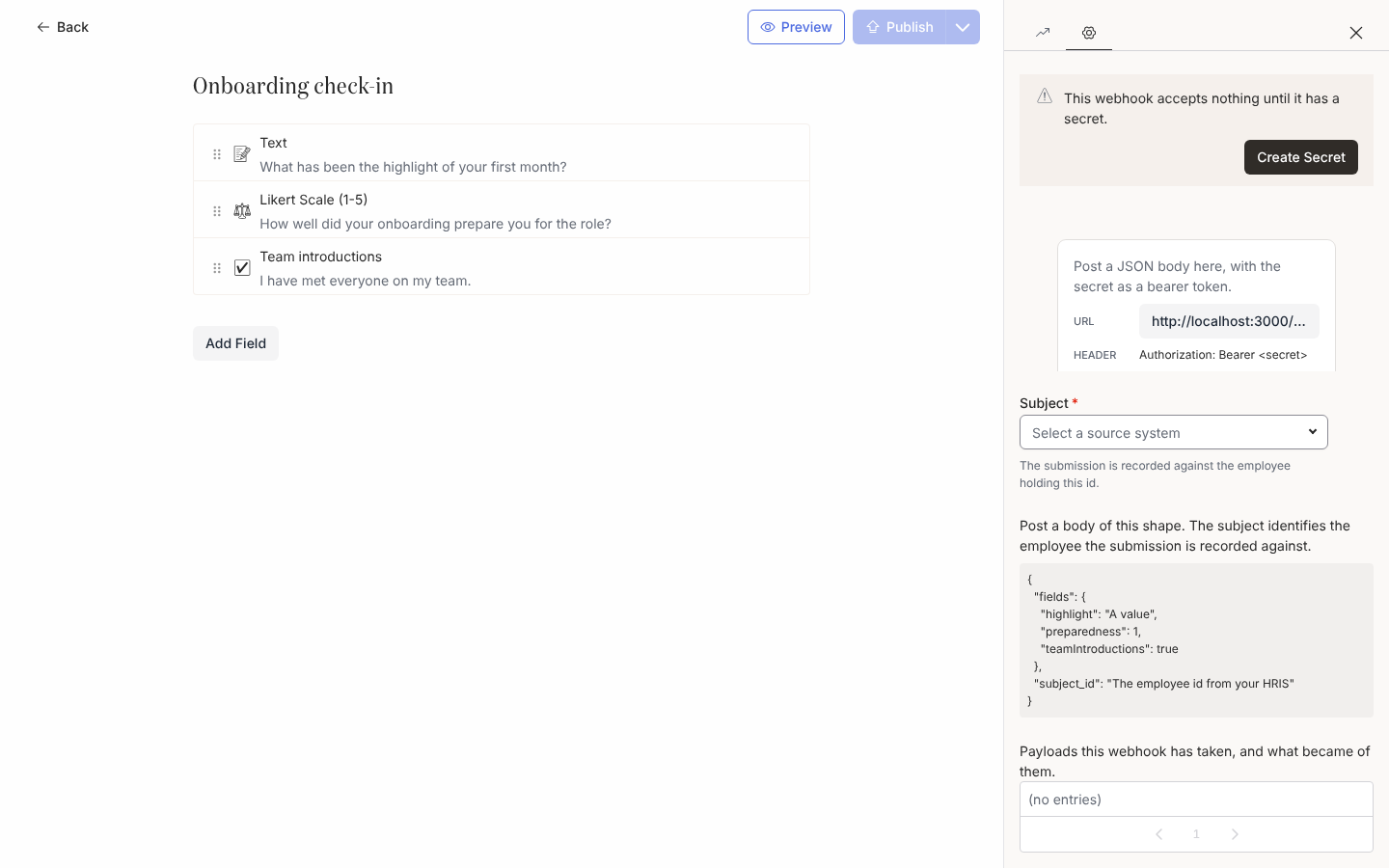
Select Settings on the rail at the right of the editor. The drawer reads Add a webhook to let another system submit this form on an employee’s behalf. Select Add Webhook.
-
Under Subject, select the source system whose id the other system will send, for example BambooHR Employee ID or Workday Worker ID. The description reads The submission is recorded against the employee holding this id.
-
Copy the URL and note the header:
Authorization: Bearer <secret>. -
Select Create Secret. The drawer reads Copy this secret now. It is shown once and cannot be retrieved later. Copy it into the other system, then select Done.
-
Read the example under Post a body of this shape. It names each field by its alias (the label in camel case) with a sample value, plus
subject_id. -
Send a test payload from the other system and read the log at the foot of the drawer (Payloads this webhook has taken, and what became of them.). A green entry reads Recorded a submission for the … identifier …; a red one names the problem.
Rotating the secret and reading the log
Section titled “Rotating the secret and reading the log”- Replace Secret rotates the secret in one step and the old one stops working at once; update the calling system before you confirm.
- The log shows the most recent entries; the export icon beside it downloads the whole log as CSV (
receivedAt,outcome,action,code,message,eventId,subjectId,submissionId). - A dropped payload also raises a notice in Notices keyed by its code, so the same mistake repeated keeps one notice current rather than many. The workspace’s notification settings decide whether every admin is emailed or the owner alone.
- Archiving the webhook from its panel menu stops it accepting anything.
What you should see
Section titled “What you should see”Accepted payloads appear as submissions in the form’s Activity drawer, and the employee’s record carries any Buddy or Mentor value. Each employee can be submitted once per webhook; a repeat is logged as already-submitted. Webhook API lists the endpoint, headers, body, responses and every log code.
Related
Section titled “Related”- Webhook API for the exact request and responses.
- Build a form for the fields a payload fills.
- Notices for where failures surface.