

Prevent repeat enrollments
Every trigger carries a re-enrollment timeout. When a trigger fires for someone who has already been through the automation, Pyn compares the time since their last enrollment with the timeout and skips them if it is too soon. This is what stops a corrected start date, a re-synced manager or a second form submission from sending the whole sequence twice.
Before you start
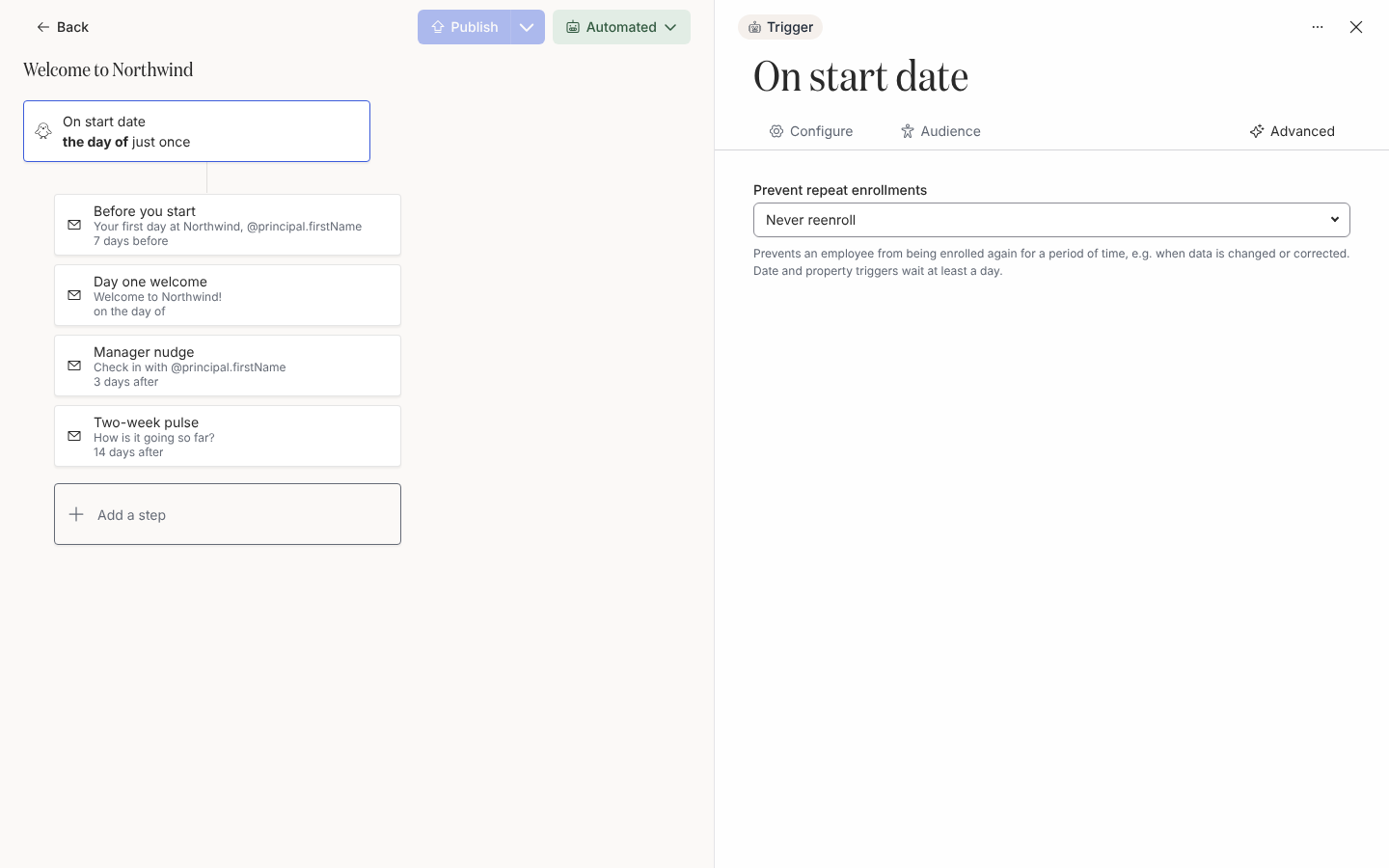
Section titled “Before you start”- The setting lives on the trigger drawer’s Advanced tab as Prevent repeat enrollments. Its description reads “Prevents an employee from being enrolled again for a period of time, e.g. when data is changed or corrected. Date and property triggers wait at least a day.”
- Pyn sets a default per trigger and the field is read-only in most workspaces. Contact support@pynhq.com to change a timeout.
-
In Pyn, open Flows in the left navigation, then Automations, and select the automation.
-
Select the trigger card, then the Advanced tab.
-
Read the value under Prevent repeat enrollments. The options are Always reenroll, 1 hour, 1 day, 2 days through 7 days, 1 month, 3 months, 6 months, 12 months and Never reenroll. Date and property triggers hide Always reenroll and 1 hour, because they are re-evaluated several times a day.
-
If your workspace can edit the value, choose a new one and select Publish.
Defaults by trigger
Section titled “Defaults by trigger”| Trigger | Default |
|---|---|
| Will be joining, Pre-onboarding, Start of Onboarding | Never reenroll |
| Off-boarding, Upcoming Anniversary, Upcoming Milestone Anniversary, Birthday (template), date properties | 1 month |
| Buddy Assigned, Promoted to Manager, Change of Manager, Group Change, Change of Location, Connected to Slack | 1 month |
| Recurring Trigger | 1 day |
| Form Submission, Custom trigger | Always reenroll |
| Employee Property (text or yes/no), No trigger | Never reenroll |
What you should see
Section titled “What you should see”An employee who re-matches inside the timeout does not get a new row under Enrollments. With Never reenroll, a person who has been enrolled once is never enrolled by the trigger again, including a rehire. To run them through again, use Manual Enroll.
Related
Section titled “Related”- Trigger catalogue for every default.
- Scheduling internals for the one-day minimum on polled triggers.
- Move an enrollment to a new start date for what to do when a date changes.