

Add escalations
Reminders nudge the person who was asked. An escalation tells somebody else, so a new starter without a buddy or an unsigned policy does not go unnoticed. The escalation recipient gets a generated notice, not a copy of the message, naming who has not completed what and when it was sent.
Before you start
Section titled “Before you start”- The step is an email or Slack direct message with a tracked button or embedded form. Channel posts cannot be escalated, because anyone in the channel can act on them.
-
In Pyn, open the automation from Flows, Automations, and select the step.
-
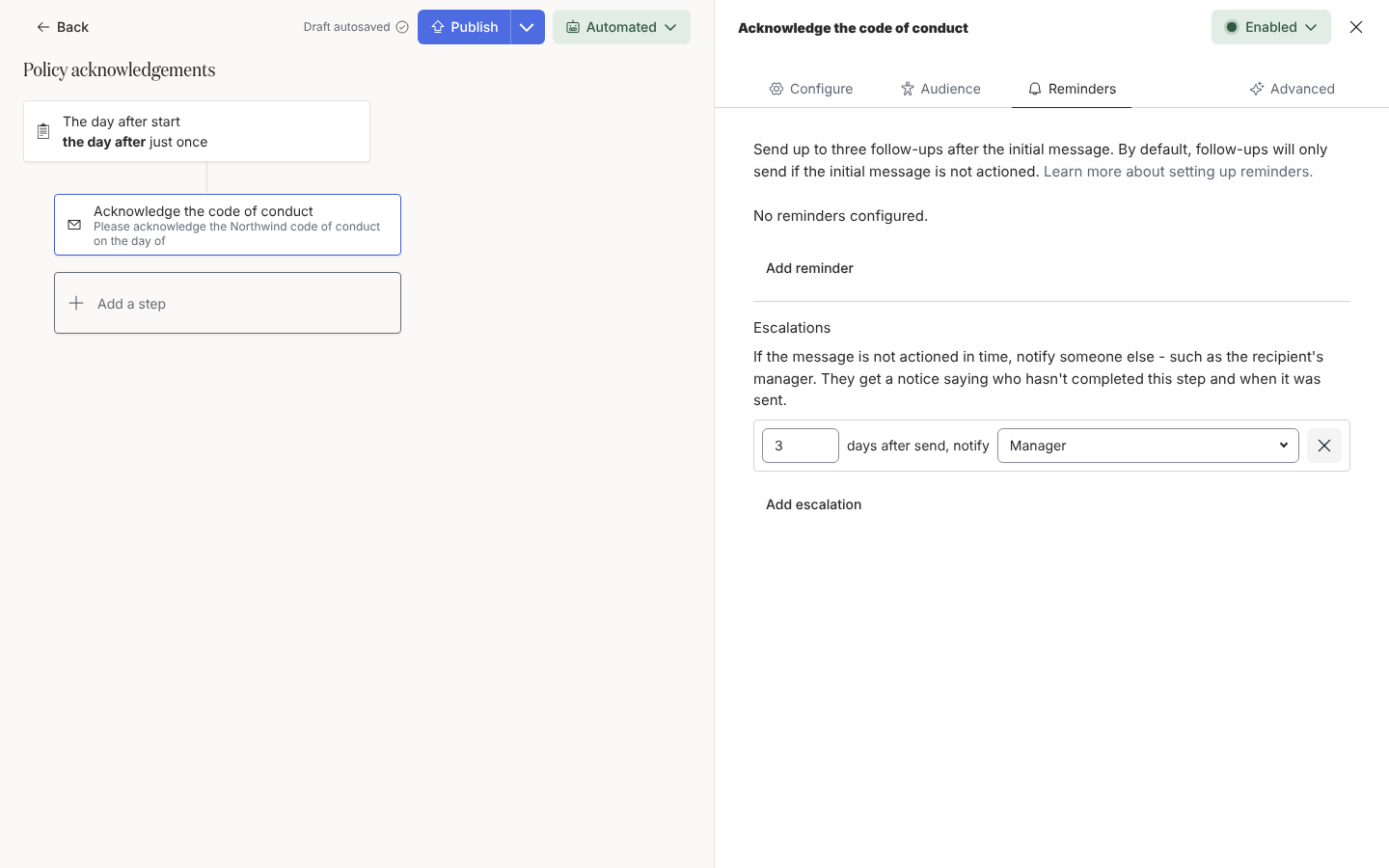
Select the Reminders tab and scroll to Escalations, under the reminders. It reads No escalations configured.
-
Select Add escalation. A row appears reading 3 days after send, notify Manager.
-
Change the number of days (1 to 90). Place it after your last reminder, so the person has had every chance to act first.
-
Select the recipient to change who is notified: under Relative to the employee, Employee, Buddy, Manager or Skip-level Manager; under People, a specific employee; on an email step, under Email addresses, a custom email recipient; on a Slack step, under Channels, a channel.
-
Add up to three escalations, for example the manager after 3 days and the skip-level manager after 7. Close the drawer and Publish the automation.
What the notice says
Section titled “What the notice says”The notice is fixed when the original is delivered. In Slack or email it reads, for example:
⏰ Jane Doe hasn’t completed Sign the handbook in New hire onboarding. It was sent on 3 Oct (5 days ago).
You’re getting this as Jane’s manager.
When the step is about someone other than its recipient, the notice adds “for” and the employee’s name. The email subject is Not yet completed: Sign the handbook (Jane Doe).
What you should see
Section titled “What you should see”Under Enrollments, the escalation appears beneath the original delivery, Scheduled for its day, and is cancelled if the recipient acts first or the enrollment is stopped. Where the step cannot be escalated the section says why: Add a button or form to this step to escalate it. or This step is posted to a channel, where anyone can action it, so it can’t be escalated.
Related
Section titled “Related”- Add reminders for follow-ups to the recipient.
- Add a button to a message to make the step actionable.
- Choose recipients and Cc for custom email recipients as escalation targets.