

Celebrate anniversaries and birthdays
No work anniversary or birthday passes unnoticed: the person hears from you on the day, their manager hears a week ahead, and the big years reach the whole team, from three automations that run every year without anyone keeping a list. For: admins and owners. Time: about 45 minutes for all three; about 15 for birthdays alone from the catalogue template.
What you’ll need
Section titled “What you’ll need”- Start Date synced for everyone and, for birthdays, Birthday provided by your HRIS; see HRIS fields. Open a few profiles in Directory to confirm. Birthdays are stored as month and day only.
- Slack connected for direct messages and channel posts, with Pyn Bot invited to the channel you celebrate in; see Slack. Email works throughout: swap Send Direct Message for Send Email to Employee.
- A privacy decision on birthdays: a static group named No birthday messages to exclude, or the Birthday opt-in template so people ask for the message; see Create a static group.
- Optional: the catalogue templates Birthday celebration and Birthday opt-in, which carry the Birthday trigger the picker has no row for. Post to Channel for milestones, where enabled for your workspace.
Build it
Section titled “Build it”-
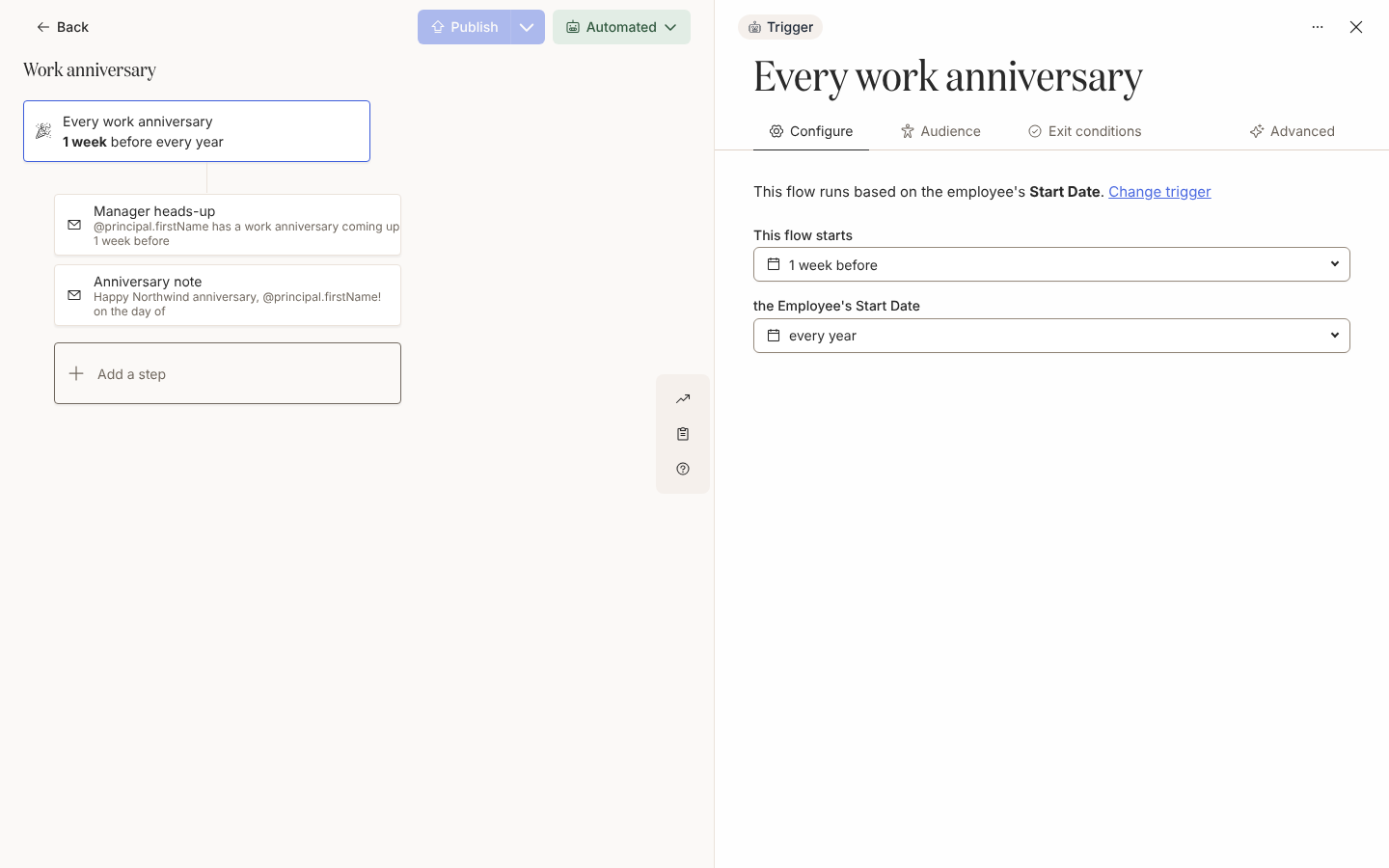
Create an automation with the Upcoming Anniversary trigger under Dates and Schedules, set This flow starts to 1 week before and keep the recurrence at every year; see Configure a date trigger.
-
Set Lifecycle to Current and exclude any group that is not celebrated, such as contractors; see Set the audience for an automation.
-
Add a Send Direct Message step to Manager scheduled 1 week before and one to Employee scheduled on the day of, both at 09:00 in the Recipient Time Zone; see Add a direct message step.
-
Create a second automation with Upcoming Milestone Anniversary, starting 2 weeks before at every 5 years, with a heads-up to Manager and, where enabled for your workspace, a Post to Channel step on the day of that mentions the person; see Post to a channel.
-
Create the No birthday messages static group from the people who have asked not to be celebrated; see Create a static group.
-
Add Birthday celebration with Add from Template, set its Lifecycle to Current, add the static group under Excluded and rewrite both steps in your voice, as in Create an automation and Tutorial: birthdays and anniversaries.
-
Publish the two anniversary automations and set them to Automated, select Use This on the birthday template, and put the milestone flow in Verification so the first milestone waits in Needs Review; see Change the mode of an automation.
Variations
Section titled “Variations”Keep every step as Send Direct Message from Pyn Bot or a personal Slack sender, and write the milestone post with a Mention Principal pill so the person is tagged in the channel. A recipient with no matched Slack account gets a Bounced delivery, so if some people are not in Slack, tick Send by email if the recipient is not in Slack on each direct message’s Advanced tab, as in Send a direct message by email when someone is not in Slack, or send the manager’s heads-up by email.
Swap each step for Send Email to Employee and set From to your People team’s mailbox, as in Choose a sender. There is no channel post by email, so the milestone flow sends to Manager and Employee only.
One Upcoming Anniversary automation on every year covers every anniversary from the first onwards; there is no need for a flow per year. If your onboarding flow already marks the one-year point, choose every year after the first so the two never land on the same day.
Watch out for
Section titled “Watch out for”- every year fires on the first anniversary and each one after it, never on the start date itself, which is year 0; see Configure a date trigger.
- Picking Birthday under Employee Properties makes a text-match flow that fires only for people whose birthday equals the
MM-DDyou type, not a yearly one; use the template; see Configure an employee property trigger. - Someone enrolled twice has re-matched outside the trigger’s gap. The anniversary and birthday triggers wait 1 month before enrolling the same person again, so a start date corrected within the month does not send twice; the field is read-only in most workspaces; see Prevent repeat enrollments and the FAQ.
- A channel missing from To means Pyn Bot is not in it or it is newer than the last refresh, and changing the sender clears the channel; see Post to a channel.
Check it worked
Section titled “Check it worked”Under Enrollments, people appear seven days before each anniversary and birthday, and fourteen days before a milestone, with the date itself as Reference Date; the manager’s message shows as delivered on the day of enrollment and the employee’s as scheduled for the day. The first milestone waits in Needs Review; see Review and unpause enrollments. A channel post lists the channel as its recipient under Messages.
Related
Section titled “Related”- Tutorial: birthdays and anniversaries to build all three in one sitting.
- Configure a date trigger for offsets and recurrence.
- Trigger catalogue for the triggers’ defaults.
- Reference dates and timing for how recurrence years and leap days are counted.