

Employee File
Employee File turns a spreadsheet into your employee directory. Each row is one employee, each column a Pyn property, and every upload is an upsert by employee id: new rows are added, changed rows are updated. Pyn validates the file before anything is saved and tells you which rows and columns it could not read.
Before you start
Section titled “Before you start”- You are an admin or owner.
- Prepare a CSV, XLS or XLSX whose column headers are the property names below. Download Sample File gives you a CSV with every column and five example rows.
- Every row needs
employeeIdandprimaryEmail. For employees in the US, Canada or Australia, give atimeZoneor apostalCodewith thecountry, or Pyn cannot place them in a zone.
Connect
Section titled “Connect”-
In Pyn, open Settings in the left navigation, then Available under Integrations.
-
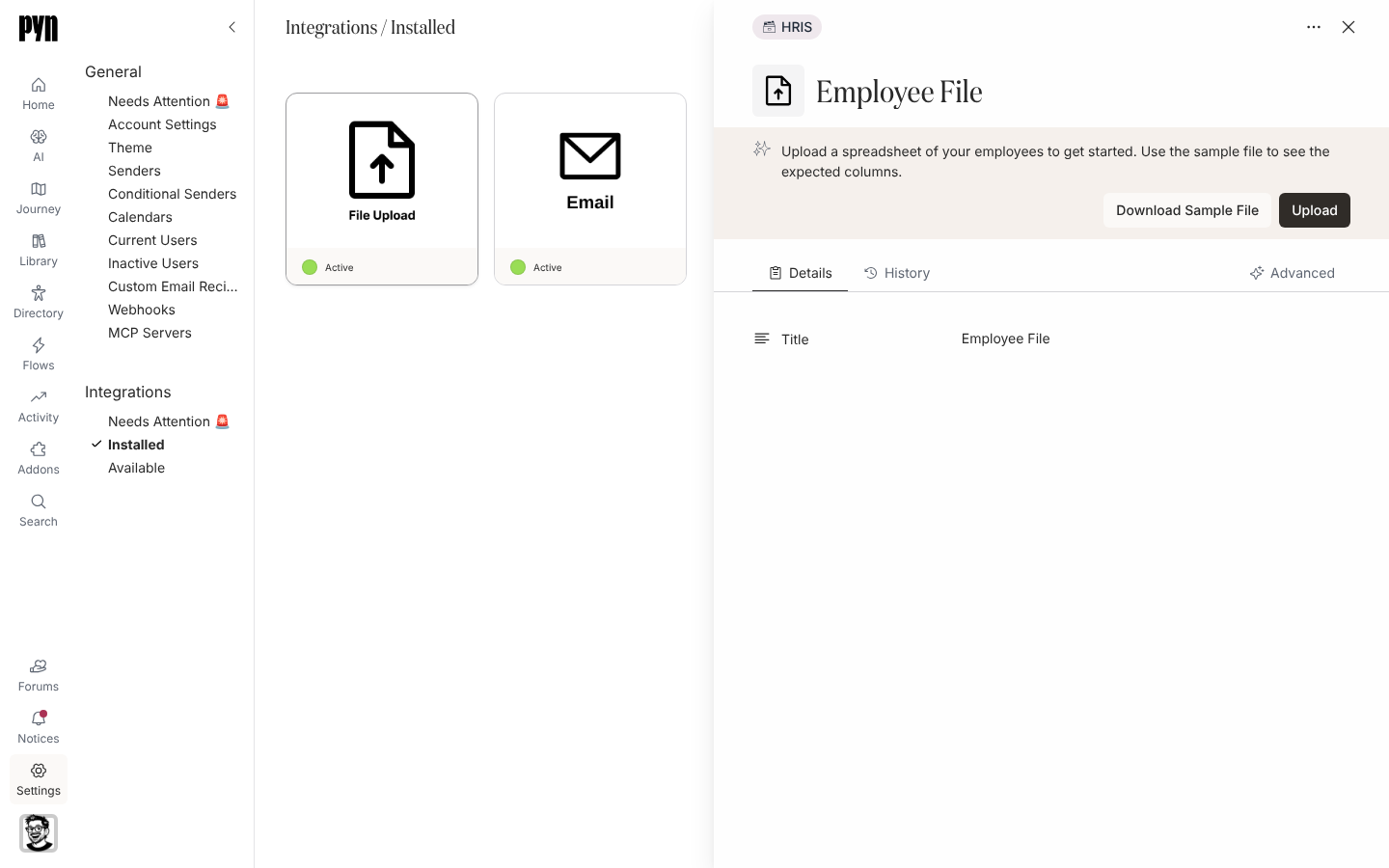
Select the Employee File tile; its cover reads File Upload. Pyn creates the integration and opens its panel: “Upload a spreadsheet of your employees to get started. Use the sample file to see the expected columns.”
-
Select Download Sample File and build your file on it, keeping the header row.
-
Select Upload and choose your file. The panel shows Uploading… while it validates and saves.
-
On success it reads “Success! Uploaded n records. Head over to the Directory to see employees after processing completes. This can take a minute or two.”
If rows fail, the panel lists them under “There were n errors found in the uploaded file:” with the row and the problem, for example Unknown country: "Engalnd", Could not determine timezone from country "United States". Add a postal code or choose a time zone. or Invalid birthday format. Expected MM-dd, dd/MM, yyyy-MM-dd or ISO8601 datetime. Fix those rows and upload again; the valid rows were saved.
What syncs
Section titled “What syncs”| Column | Required | Notes |
|---|---|---|
employeeId |
Yes | Your stable id for the person; uploads match on it |
primaryEmail |
Yes | Work email, also used to match Slack and Google accounts |
displayName, legalName, preferredName, jobTitle |
||
personalEmail, secondaryEmail, avatarUri |
Personal email is used for pre-boarding | |
status |
active, inactive or leave |
|
startDate, terminationDate, tenureDate |
yyyy-MM-dd |
|
birthday |
MM-dd, dd/MM, yyyy-MM-dd or an ISO date-time |
|
country, postalCode, timeZone |
Country as a name or ISO code; time zone as an IANA name such as Europe/London |
|
businessUnit, department, division, location, team |
Become demographics and groups | |
managerId, buddyId, hrbpId, mentorId |
The employeeId of the related person |
There is no scheduled refresh; the file is read when you upload it. The Advanced tab lists Fields in Employee File with a count per column. You can also add one person at a time with Add employee in Employees, which asks for Full name, Preferred name, Work email, Personal email, Start date, Country, Time zone and Manager, and adds them as an upcoming joiner.
Test it
Section titled “Test it”Open Employees a minute or two after the upload. Active rows appear under Active, future start dates under Upcoming, and status of inactive under Inactive. Open a person to check their manager link.
Reconnect or disconnect
Section titled “Reconnect or disconnect”There are no credentials. Upload a new file to change data; rows absent from a later file are left as they were. Deactivate keeps the data but ignores uploads; Activate re-enables them.
Troubleshooting
Section titled “Troubleshooting”| What you see | What it means |
|---|---|
| “The uploaded file was empty” | No data rows below the header, or the header row is missing. |
A row error naming country or postalCode |
The country name was not recognised, or the postal code did not resolve to a zone. Add timeZone. |
| A manager is not linked | managerId does not match any row’s employeeId. |
| Someone shows twice | Their employeeId changed between uploads. Keep ids stable. |
Related
Section titled “Related”- Integrations for the HRIS alternatives.
- Employees to check the uploaded records and add one person.
- Sync cadence and matching for how ids and emails match.
- Sample Data to try Pyn with a fictional roster instead.