

Choose a sender
Who a message comes from changes how it lands. A welcome from the CEO’s own address, a nudge from Pyn Bot and a policy update from people@ are all right in their place. Every message step has a From field that chooses one of the workspace’s senders.
Before you start
Section titled “Before you start”- You are an Admin to add senders under Settings. Power Users pick from the senders that exist.
-
In Pyn, open the automation from Flows, Automations, and select the step.
-
On Configure, select From (it reads Choose sender until you pick one). The list shows the senders that match the step’s medium: Slack senders on a Slack step, mailboxes and verified addresses on an email step. When conditional senders exist, the list has two sections, Senders and Conditional Senders.
-
Select the sender. On a Slack step the editor shows the sender’s avatar and name above the message.
-
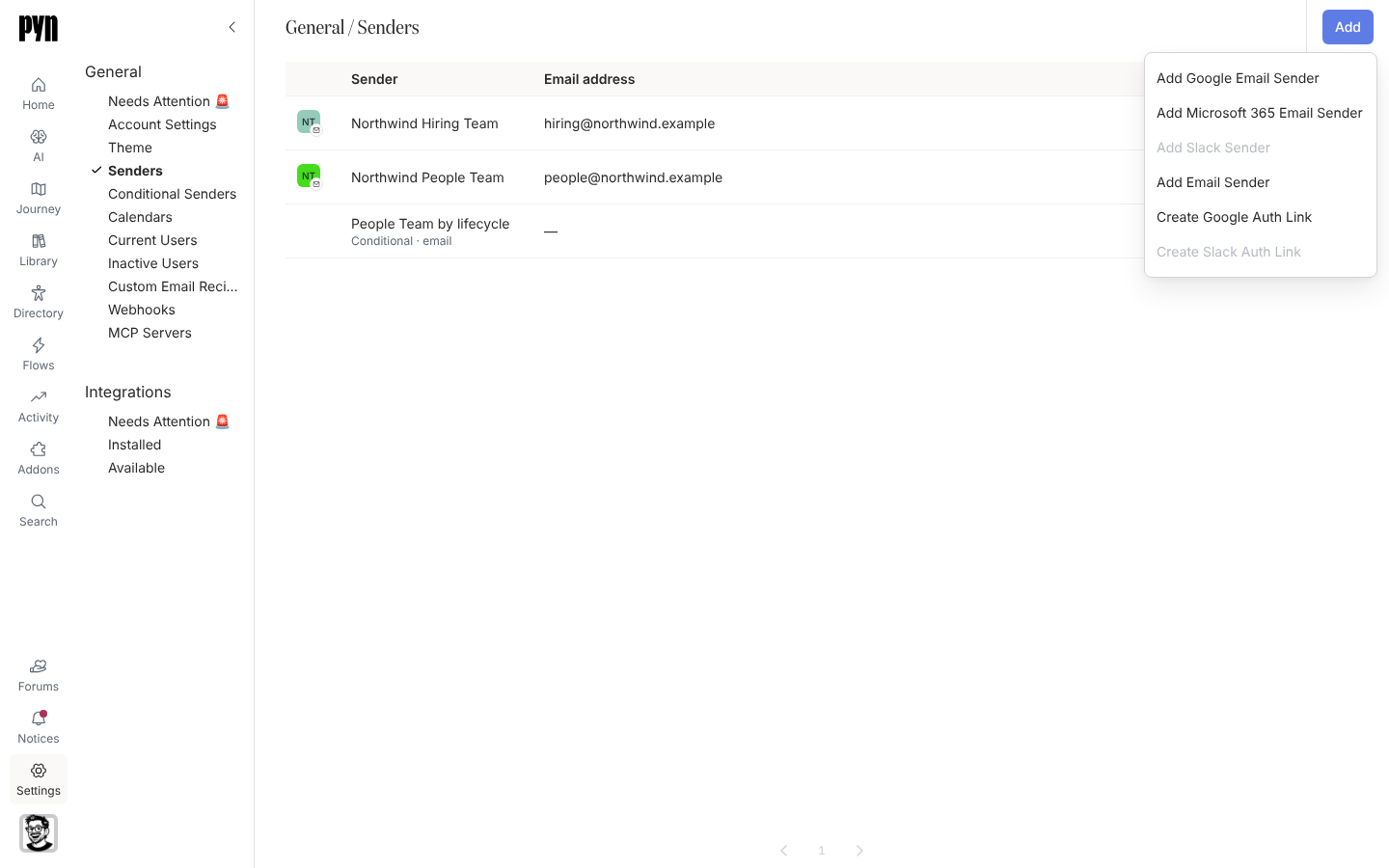
If the sender you need is missing, open Settings, select Senders, and select Add in the top-right corner. The menu offers Add Google Email Sender, Add Microsoft 365 Email Sender, Add Slack Sender (one entry per connected Slack workspace), Add Email Sender for an address on a verified domain, and Create Google Auth Link or Create Slack Auth Link.
-
For a sender that belongs to someone else, such as the CEO, choose an auth link. Pyn gives you a link, valid for three days, that the person opens to connect their own Google or Slack account as a sender without signing in to Pyn.
-
Back on the step, select From again and pick the new sender.
Sender types
Section titled “Sender types”| Sender | Medium | Where it comes from |
|---|---|---|
| Pyn Bot | Slack | Installed with the Slack integration. |
| A Slack user | Slack | Add Slack Sender by that user, or a Slack auth link. |
| Google Workspace mailbox | Add Google Email Sender by the mailbox owner, or a Google auth link. See Google Workspace. | |
| Microsoft 365 mailbox | Add Microsoft 365 Email Sender. See Microsoft 365. | |
| Verified email sender | Add Email Sender: an address on a domain you have verified with DNS records. See Email. | |
| Conditional sender | Email, Slack or Teams | Rules that pick one of the above per recipient. See Create a conditional sender. |
What you should see
Section titled “What you should see”The step shows the sender under From, and a test from Preview arrives from that identity. A sender that needs reconnecting is flagged under Settings, Needs Attention, and steps that use it fail to send until it is fixed. Archiving a sender warns Sends on these steps will fail once this sender is archived: with the list of steps.
Related
Section titled “Related”- Create a conditional sender to send from different people by audience.
- Email for mailboxes and verified domains.
- Slack for Pyn Bot and personal Slack senders.
- Settings, General for the Senders and Needs Attention views.