

Agents
An agent in the preview is a skill: a named job with a description, a prompt that spells out what it does, an owner, and a journey moment it belongs to. Skills is the catalogue; Runs is what has happened.
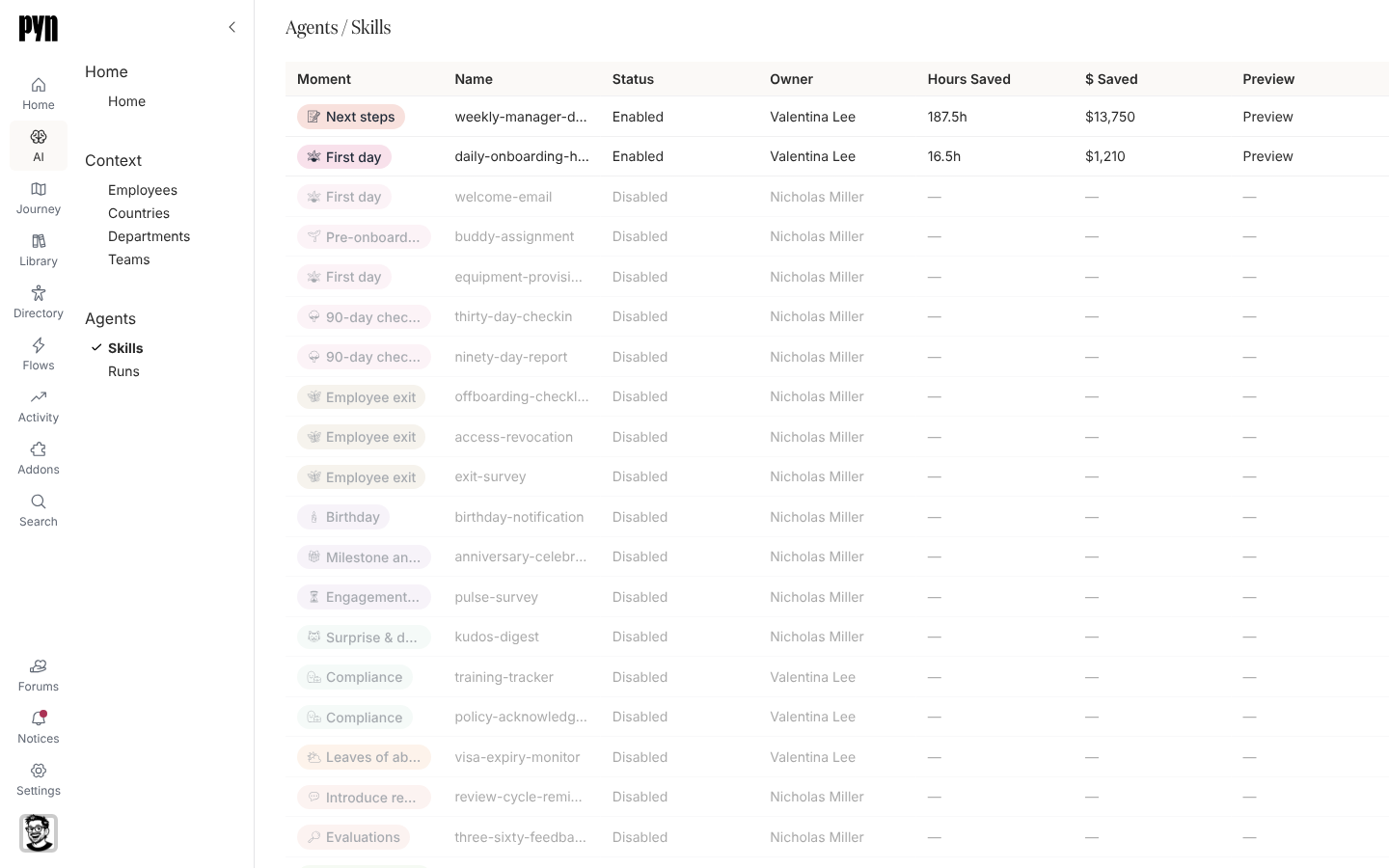
Skills
Section titled “Skills”The table has Moment (a chip for the journey moment), Name, Status (Enabled or Disabled), Owner, Hours Saved and $ Saved (totals across the skill’s runs, or a dash), and Preview (a link to a sample image for the two enabled skills). Select an enabled row to open the skill’s page:
- Owner, Hours Saved and $ Saved;
- Description, in a sentence or two, including when the skill is meant to be triggered;
- the full prompt the skill runs with, as written: for the manager digest, the fixed header and footer, the priority order of categories from onboarding to compliance, the action labels and the data sources per category;
- Recent Runs, with Run, Status, Started, Duration and Result, ten to a page.
Skill catalogue lists all 22.
The Runs table has Skill, Status, Started, Duration, Hours Saved, $ Saved and Triggered By. Every recorded run is completed and was triggered by schedule. Select a row to open the run’s page, titled Run and its id, with a Details section repeating those fields and a Result section, for example “Digest compiled and sent to 42 managers.” or “Report generated. 4 active onboardings, 1 at-risk, 2 flags.”
Where it is in the app
Section titled “Where it is in the app”Open /ai/agents/skills or /ai/agents/runs in Pyn, or select AI in the left navigation and then Skills or Runs under Agents.
Related
Section titled “Related”- Skill catalogue for every skill, its moment and its purpose.
- Context for the data the skills read.
- AI for what the preview is and who sees it.