

HiBob
The HiBob integration reads people from Bob’s API and keeps the Directory current: names, work and private email, start and termination dates, probation end date, department, title, site, manager, HRBP and, if you have a custom field for it, buddy. Pyn reads only; it never writes to Bob.
Before you start
Section titled “Before you start”- You are an admin or owner in Pyn.
- Choose how to connect. Connect with HiBob signs you in to Bob and authorises Pyn. Use a service user instead takes a Bob Service User ID and API Token that a Bob admin creates under Settings > Integrations > Service Users.
- Grant the service user, or your own account, view access to the people fields Pyn reads: About, Address (city, country and postal code), Basic Info, Employment, Home (private email), Jobs, Lifecycle, Personal (short birth date) and Personal Contact Details, for employees including pre-hires and leavers.
Connect
Section titled “Connect”-
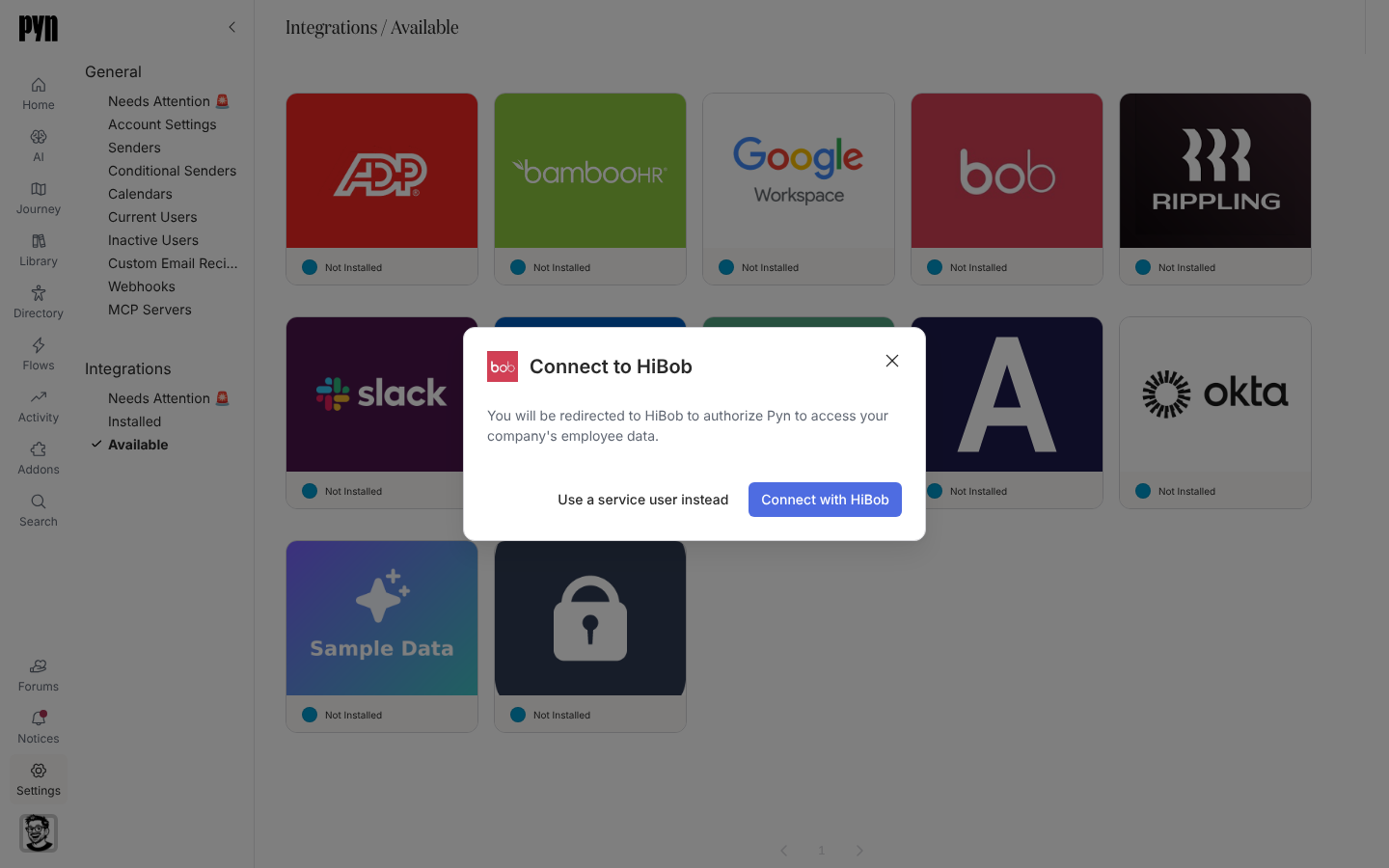
In Pyn, open Settings in the left navigation, then Available under Integrations.
-
Select the HiBob tile. The Connect to HiBob dialog opens: “You will be redirected to HiBob to authorize Pyn to access your company’s employee data.”
-
To sign in, select Connect with HiBob, authorise Pyn in Bob and return.
-
To use a service user instead, select Use a service user instead, paste the Service User ID and API Token, and select Connect. The dialog shows “Validating those credentials…”
-
On success a notice reads “Your HiBob integration has been added to Pyn. It will take a minute or two for employee data to be pulled from HiBob.”
Errors the dialog can show: “Could not verify the credentials — the service user ID or token appears to be invalid.” / “The credentials are valid but the service user lacks the permissions needed to read employees. Grant the service user people-read access in Bob.”
What syncs
Section titled “What syncs”Pyn refreshes from Bob every five minutes while the integration is active, skipping runs where nothing changed, and records each run under History. The Advanced tab lists Fields in Report: the Bob field ids your tenant returned and for how many people, which is the place to look before concluding a field is unavailable.
| Pyn property | From Bob |
|---|---|
| Display name, legal name | Display name, or first name and surname |
| Work email, personal email | Email and private email |
| Start date, tenure date | Start date (tenure mirrors it) |
| Termination date, probation end date | Internal termination and probation end dates |
| Department, job title, location | Work department, title and site (falls back to address city) |
| Manager | Reports-to, matched by Bob id or employee id in company |
| HRBP | The employee.hrbp field |
| Buddy | The custom field named on the integration as the buddy field, set up with Pyn support |
| Birthday, country, postal code, time zone | Short birth date and address; time zone from country and postal code |
| Contract type, work office and other custom columns | Workspace extensions mapped to a Bob field id |
See HRIS fields for the matrix.
Test it
Section titled “Test it”Open the HiBob tile under Installed and check History for a successful refresh, then open Employees and confirm start dates, titles and managers.
Reconnect or disconnect
Section titled “Reconnect or disconnect”- Reconnect opens Reconnect to HiBob with the same two choices. After rotating a service user token in Bob, paste the new API Token here. “Your HiBob integration has been updated.” confirms it.
- Deactivate stops syncing; Activate resumes.
Troubleshooting
Section titled “Troubleshooting”| What you see | What it means |
|---|---|
| History: “Error: Authentication failed, please reconnect” | The token was rotated or the sign-in revoked. Reconnect. |
| History: “Error: Insufficient HiBob permissions” | The service user lost people-read access or a field group. Widen its permissions in Bob. |
| People or fields missing | Check Fields in Report under Advanced; a field absent there is not visible to the service user, or your tenant does not have it. |
| Leavers still active | Grant lifecycle access to former employees so termination dates sync. |
Related
Section titled “Related”- Integrations for the catalogue.
- HRIS fields for the field matrix.
- Sync cadence and matching for schedules and matching.
- Employees to check the synced records.