Skip to content
PynPyn

Changelog

New features, improvements and fixes in Pyn, one post a week. Each post tells the story of the week’s biggest changes, then lists every fix and improvement.

Duplicate a step within its flow

A step can now be copied within its flow. The copy keeps the step’s content, recipients, schedule, reminders and escalations, ready to adjust for the next message in the sequence.

Admins connect Okta through a single dialog, and can replace its credentials and copy the redirect address from the integration panel. The panel also has the sign-in link for an Okta dashboard tile, so employees can open Pyn straight from Okta. Connect Okta

You can preview a message for an upcoming joiner as well as a current employee. When a step goes to the employee’s manager, buddy or HR business partner, the preview uses that person’s details and hides the conditional sections that do not apply to them. Preview and send a test

  • Start an automation when an employee is connected to Slack.
  • Set a company name in Settings for messages; without one, Pyn uses the workspace name.
  • Pick HR business partner names and email addresses from the personalisation picker in email and Slack editors.
  • Refresh a Google Workspace sender’s name and email address from its menu, without reconnecting.
Fixes and improvements 18
  • You can configure a flow’s trigger directly from its No Trigger tab.
  • Before archiving an email, Google Workspace or Slack sender, you now see a warning listing the active automation steps that use it.
  • You can preview a message for an upcoming joiner as well as a current employee.
  • The preview employee selector now reads “Preview for principal” to distinguish the employee the step is about from its recipient.
  • Change of Manager automations now enroll the employee whose manager changed.
  • Change of Location automations now run when an employee’s country changes, and their trigger panel opens correctly.
  • Relationship-based automation triggers now respect their configured filters.
  • Archived campaign messages now disappear from the calendar and its sidebar list.
  • Multi-select fields now open when you click their empty space, while selected items remain removable.
  • Conditional-section fields now use consistent widths and readable placeholder text.
  • Step previews now load the saved message without being incorrectly blocked, and campaign HTML previews find the correct step.
  • When a step targets an employee’s manager, buddy or HR business partner, previews now use that person’s details when the relationship can be resolved.
  • Personalized previews now hide conditional sections that do not match the selected employee and resolved recipient.
  • Conditional-section dialogs stay open while you edit them, and updating or removing a section targets the section you opened.
  • Typing after a personalization placeholder or link in a conditional section no longer jumps to the start of the paragraph.
  • Link buttons in the editor now expand to fit longer labels, shortening them only when the available space is too narrow.
  • Discarding unpublished flow changes no longer makes an automated or manual flow appear inactive.
  • Messages to custom email recipients now fill in name and email personalization from that recipient’s details.

Release notes: 23 October 2026.
Escalations, and HR business partners from HiBob

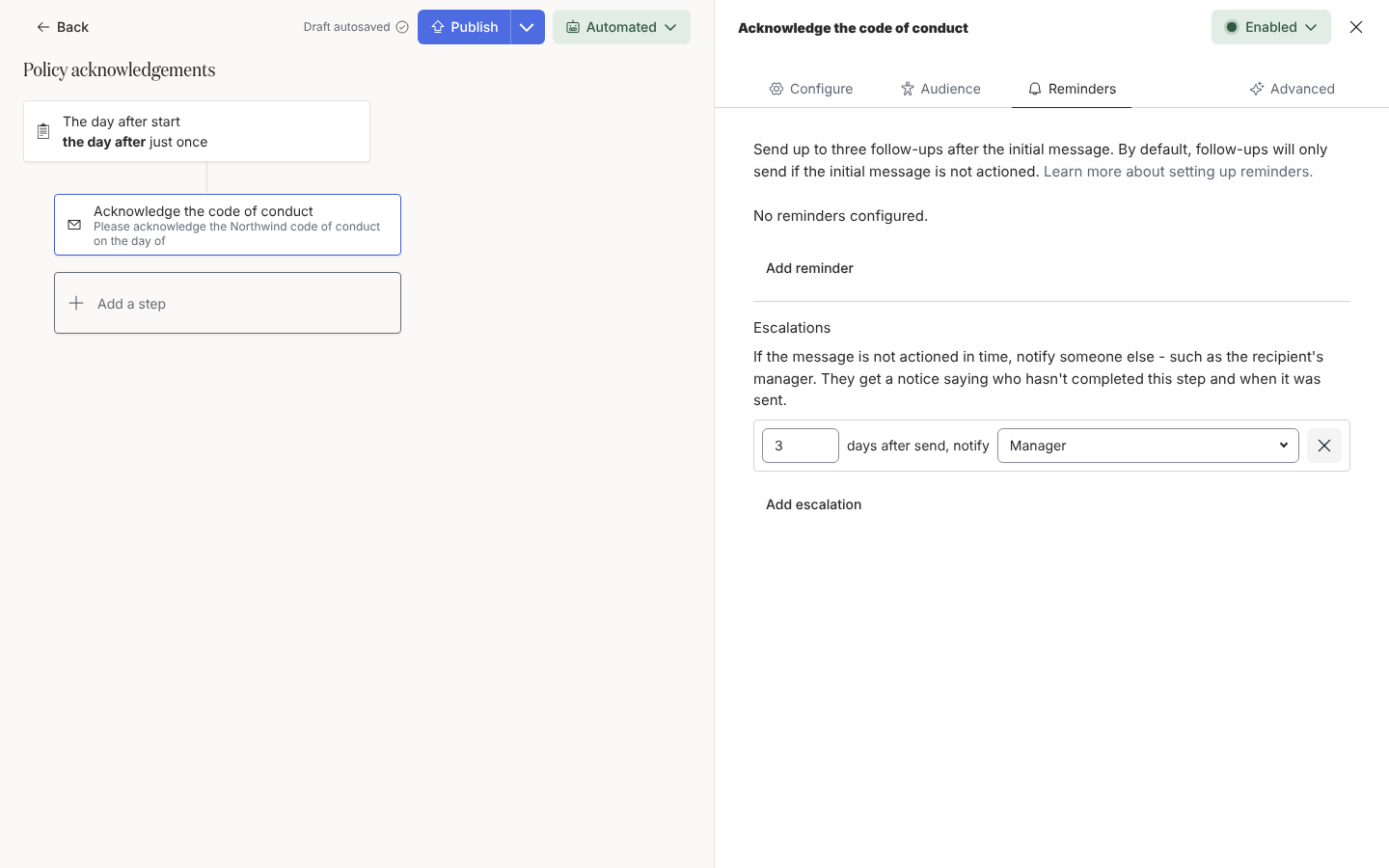
The Escalations section with one row reading 3 days after send, notify Manager.
An escalation notifies someone other than the recipient when the step is still not actioned.

When someone has not completed an action, Pyn can now tell someone else. On an email or Slack step, under Reminders, add up to three escalations. After the number of days you choose, Pyn sends a short notice to someone such as the recipient’s manager, saying what is outstanding and since when. Add escalations

HiBob now brings in each employee’s HR business partner. They show on the employee profile, messages can include their name, preferred name or email address, and they can receive workflow messages and actions. HiBob also brings in buddies, probation end dates and the custom fields you configure. HiBob

  • Filter the Actions view by completion status, and export it to CSV with your current filters and sort order.
  • Build employee groups from type of contract or work office.
  • Preview a saved HTML email with the personalisation for a chosen recipient.
Fixes and improvements 16
  • Employee group panels and Google Workspace and Microsoft 365 integration panels now have consistent spacing around their contents.
  • You can read the full text of shortened audience and selection labels by hovering over them.
  • Options in selection lists have more space around their highlighted text.
  • The Slack recipient dropdown now opens and shows “No results” when the sender has no available channels.
  • Long webhook URLs and secrets now fit within the sidebar while still copying in full, and the Done button stays visible.
  • Date fields in Firefox now show a single calendar icon.
  • Calendar navigation arrows now fit neatly inside their buttons.
  • Download buttons in Notices now fit within their rows.
  • Download expiry values in Notices now use the same text size as the label beside them.
  • Escalation notices now correctly label HR business partner recipients.
  • HTML email templates now fill in supported personalization such as a manager’s preferred name instead of showing the placeholder.
  • ADP worker types can now reflect the primary work assignment once the updated mapping is enabled and employees sync again.
  • Integration refresh dates now show the recorded refresh and successful refresh times instead of appearing unset.
  • Selection menus now follow the correct width limits.
  • The audience editor now correctly prompts you to select lifecycle stages in the lifecycle field.
  • Date fields now show a calendar icon in browsers that support it.

Release notes: 12 October 2026 and 16 October 2026.

See who has acted in the Actions view

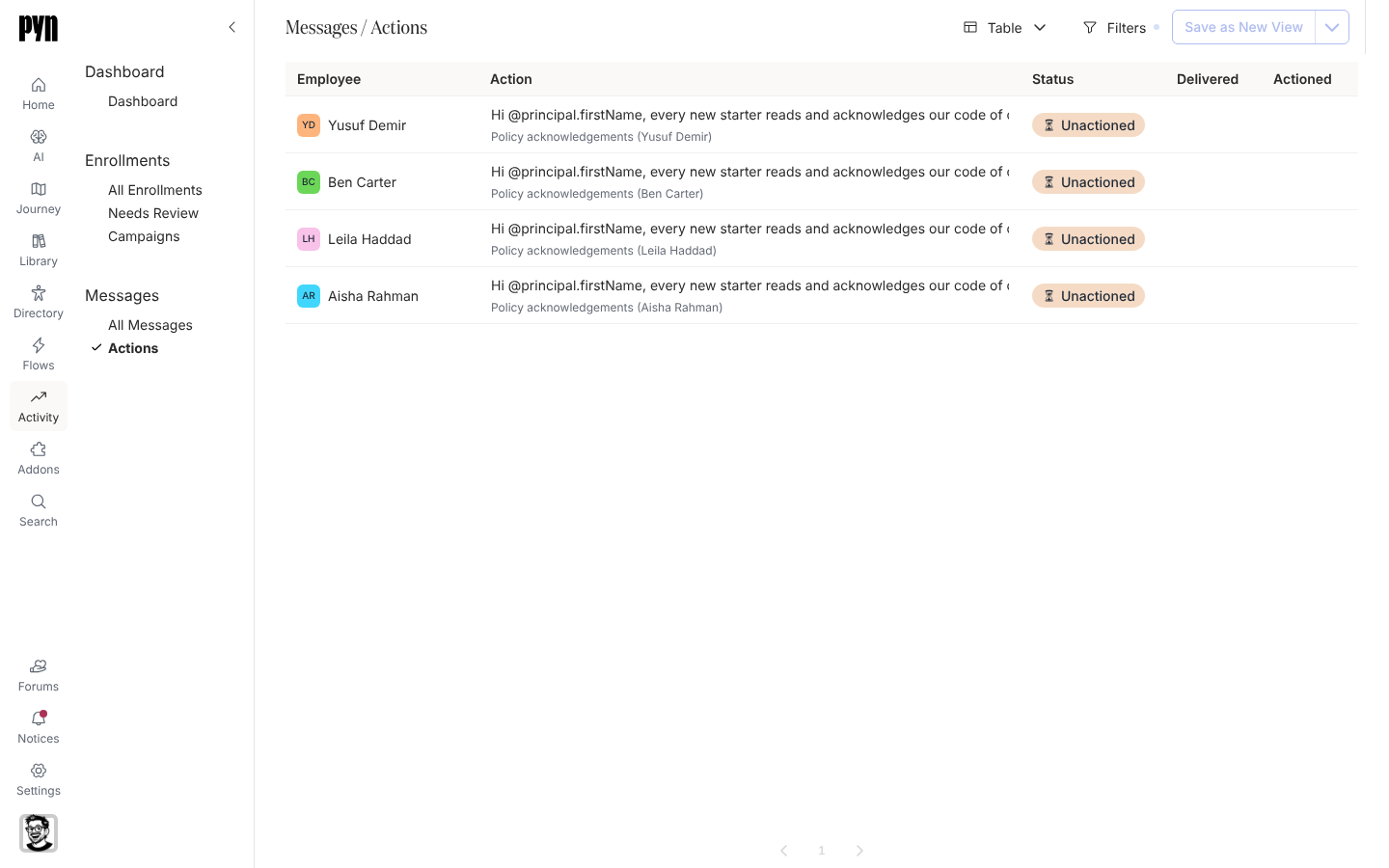
The Actions view in Activity with Employee, Action, Status, Delivered and Actioned columns.
The Actions view, one row per delivery that asked for something.

The new Actions view in Activity lists every message that asked an employee to do something: who was asked, what they were asked to do, and whether they clicked or completed it. Open it to see which acknowledgements, forms and tasks are still outstanding. Track actions

Automation, campaign and content templates now wait in the catalogue until you add them, so your workspace holds only the ones you use. Add one from its list, or straight from a journey moment. Add a campaign template

  • BambooHR change notifications appear in the integration’s History, for workspaces with them turned on.
  • Sign-in sessions expire one day after you sign in, and Pyn blocks requests from other websites that try to use your session.
Fixes and improvements 14
  • HTML emails can now be published with unrecognized placeholders, which appear unchanged in the rendered email.
  • Pyn now blocks browser requests identified as coming from another website that try to make changes using your signed-in session.
  • Sign-in sessions now expire one day after signing in, even if you keep using Pyn or switch workspaces.
  • Integration refresh dates now display the recorded refresh and successful refresh times instead of appearing unset.
  • Campaign calendar dates remain readable when hovering over days without a filled background.
  • Editing a form or poll title now enables publishing the change.
  • Changes to automation and content titles now save reliably.
  • Scheduling a step in a paused enrollment now moves the enrollment to pending.
  • Edits to HTML content now save without being incorrectly blocked.
  • Test messages now send successfully when the saved message contains HTML.
  • Sessions now expire one day after sign-in, even when you switch workspaces.
  • If exporting a journey as an image fails, the board returns to its normal layout and displays an error.
  • Sending a test message now uses the saved step content so HTML messages no longer trigger request filtering that blocks the test.
  • A failed journey image export now shows an error and restores the board so you can keep working without reloading.

Release notes: 6 October 2026 and 9 October 2026.

Outlook email and calendars, and Ashby

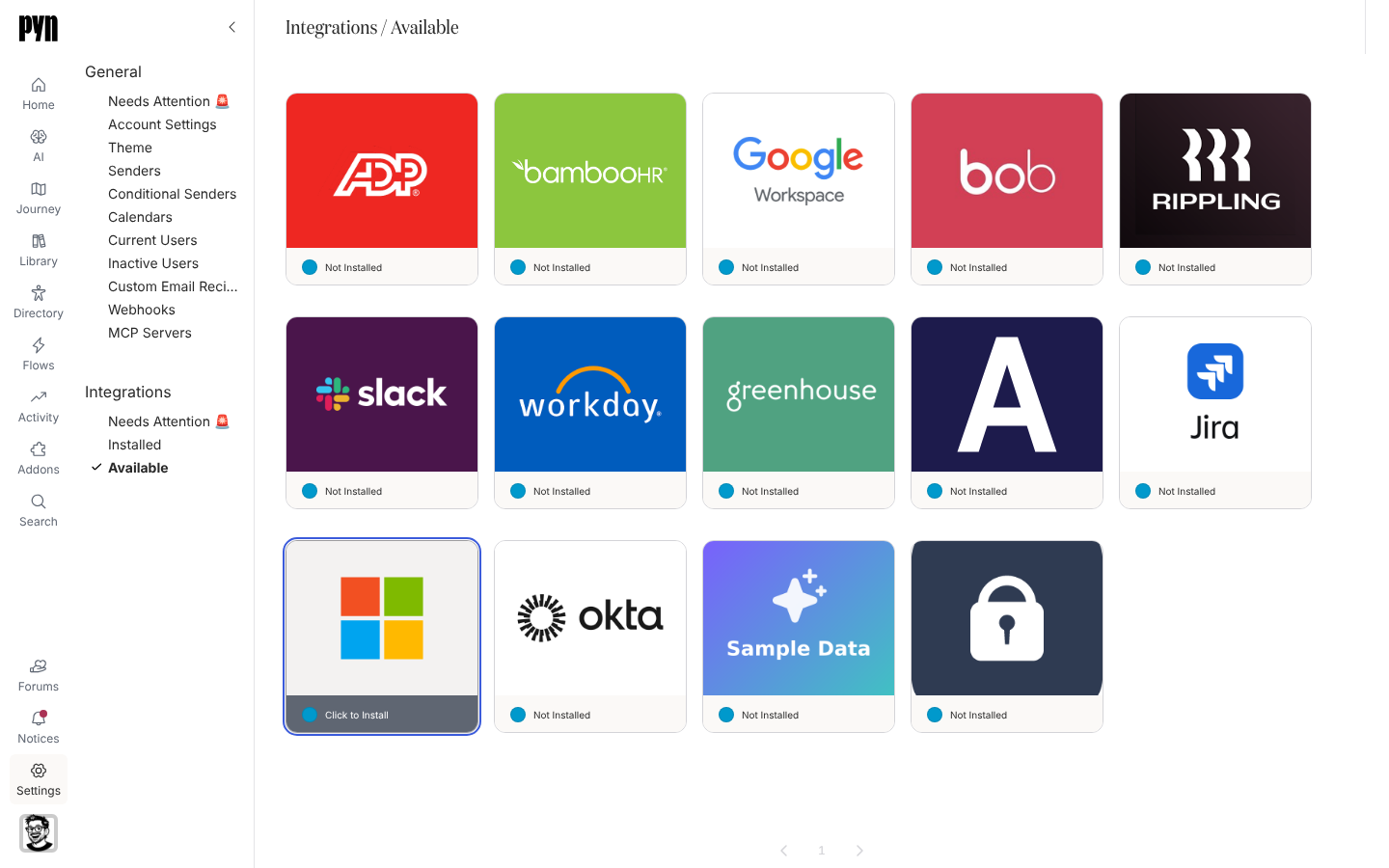
The Available gallery with the Microsoft 365 tile highlighted.
The Microsoft 365 tile under Available; selecting it starts the Microsoft sign-in.

Pyn now works with Microsoft 365. Connect a work or school account as a sender and workflow emails go out through Outlook. Connect an Outlook calendar and calendar steps invite employees to recurring events, as they do with Google Workspace. Both need Microsoft 365 enabled for your workspace. Microsoft 365

Connect Ashby and hired candidates come into Pyn before their start date, with their job details and hiring manager, so pre-boarding starts before day one. Ashby

  • An auth link, valid for three days, lets someone without a Pyn login connect a Slack or Google Workspace sender.
  • Anniversary automations can repeat every year after the first.
  • The Flows list shows enrollment counts for the date range you choose.
  • Deleting a form field shows an Undo message for eight seconds.
  • Needs Attention in Settings gathers the senders, calendars and users that need fixing, and senders show when they need reconnecting.
Fixes and improvements 73
  • BambooHR connection details now focus on your subdomain, primary source setting and latest refresh results.
  • Sandbox workspaces now show a yellow navigation warning so you can distinguish them from your live workspace.
  • Delivery verification now shows a date for each message, using its latest delivery date when available or its earliest scheduled date otherwise.
  • You can see each enrollment’s reference date when choosing which enrollments to update to a newly published automation version.
  • You can search for audience groups beyond the first 500 groups and still see the names of groups already selected.
  • Employee lists now show profile pictures and give country and time zone names more room.
  • Needs Attention now appears first in each settings navigation group.
  • Automation and campaign steps can recover from an interrupted scheduling update instead of leaving future deliveries unscheduled.
  • Pyn loads less data when you first open it and makes fewer background requests when you return to a tab.
  • General settings now bring senders, calendars, users and other shared settings together with one Needs Attention view.
  • Google Workspace and Slack senders now show when they need to be reconnected.
  • You can choose how to sort the Flows table for your current session.
  • You can now reach Add Step in the campaign calendar sidebar using the keyboard.
  • Employee lists now show profile pictures and give time zone names more room.
  • Deliver on previous delivery day now moves messages back to an allowed delivery day instead of stopping on a day you have chosen to skip.
  • Campaign step, enrollment and milestone dates no longer appear a day early in time zones west of UTC.
  • Today on the campaign calendar now returns to the current month when you are viewing January.
  • You can now resend emails sent through SendGrid to a custom email address.
  • A failed attempt to archive a flow now shows an error and releases the Change Mode dialog so you can use or close it.
  • Relationship group membership now updates reliably when employee records refresh.
  • A failed notification email no longer stops notifications for subsequent recipients.
  • A failed sign-in email no longer interrupts the sign-in service for other users.
  • Connecting Slack now shows an error when the connection fails instead of appearing to do nothing.
  • Testing a Slack sender connection now reports the actual outcome instead of always saying Sent.
  • Emergency contact, dependant and qualification forms now show an error when saving fails.
  • Expense claims and attendance requests now show an error when submission fails.
  • Punching in or out and cancelling leave now show an error when the action fails.
  • Email theme settings now restore the saved theme and show an error when changes cannot be saved.
  • Withdrawing attendance or training requests, waiving benefits and cancelling expense claims now show an error when the action fails.
  • Updating goal progress, submitting or acknowledging a performance review and completing tasks now show an error when the action fails.
  • Timesheets now show errors when saving hours, submitting, cancelling, starting a period or adding a line fails.
  • Workspace logo settings now show an error when a new logo cannot be saved.
  • Integration card logos now sit centrally instead of appearing cropped or too low.
  • Reconnecting a Google Workspace or Outlook calendar now preserves the calendar you selected.
  • Invitations to an event series removed from a Google Workspace or Outlook calendar now report Event Not Found instead of attempting to send.
  • You can now use the page controls to browse Outlook calendar events.
  • Scheduled date fields now open a date picker when configuring a workflow step or duplicating a campaign enrollment.
  • Link editing fields now stack vertically instead of sitting side by side.
  • Date and property automation settings now show the one-day minimum wait between repeat enrollments and hide shorter options.
  • Archived journey categories now disappear from the board immediately without a refresh.
  • Custom scheduling options now open beside the Custom choice instead of floating over the message editor.
  • Filter group settings now give the included and excluded group fields the full form width.
  • Recurring automation settings and message step options now have space between their fields and labels.
  • Date and property automations now wait at least one day before enrolling the same employee again, and their settings show that minimum.
  • HiBob can now match managers using company employee numbers when its usual manager ID is missing and the required fields are available.
  • You can now export enrollments and Flows views to CSV without an access-denied error.
  • Microsoft Teams membership alone no longer keeps an employee marked as currently employed.
  • Workday reports with a mix of worker IDs and employee IDs no longer drop employees who have only an employee ID.
  • Rippling and ADP connections now flag credential problems that previously appeared as temporary sync failures.
  • Notification action buttons no longer stretch across the panel header.
  • The free automation banner now keeps its message and outlined action button together on one row.
  • Scheduling menus now line up with their fields and keep custom timing options beside the Custom choice.
  • Small groups of profile pictures overlap less, making initials easier to read.
  • The Automations table header now extends across the full row.
  • Email and Google Workspace senders now show their avatars in Notices and use email-based initials when no display name is set.
  • Emoji icons now remain readable against strongly coloured backgrounds.
  • Sender badges in panel titles no longer cover the sender’s initials.
  • Save as New View now adds an asterisk to the copy’s name so you can distinguish it from the original.
  • Saving or duplicating a view now opens the new view immediately without reloading the page.
  • New journey categories and changes to a moment’s owner now appear without a refresh.
  • Version History now shows a newly published content version straight away.
  • Creating a Filter or Static employee group no longer leaves the page stuck behind an invisible overlay.
  • Theme settings no longer get stuck repeatedly loading.
  • Available integrations no longer include integrations you have already installed.
  • Connecting a Google Workspace sender or calendar from blue.pyn.ai now returns you to the same site to finish signing in.
  • Generated exports are now downloadable only by the person who requested them, and older exports without a recorded owner must be requested again.
  • Reports now check that you have permission to access the requested metrics.
  • Stopped enrollments no longer create reminders when an in-progress message finishes sending.
  • Duplicating a stopped campaign no longer prevents reminders in the new enrollment.
  • Email delivery updates from SendGrid can now reach Pyn.
  • Employees can now preview only their own leave requests unless they are an administrator.
  • Archived sign-in identities no longer retain access through an existing session.
  • Date offset menus now line up with the scheduling field that opens them.

Release notes: 28 September 2026, 29 September 2026, 30 September 2026, 2 October 2026, 3 October 2026 and 4 October 2026.

Single sign-on and conditional senders

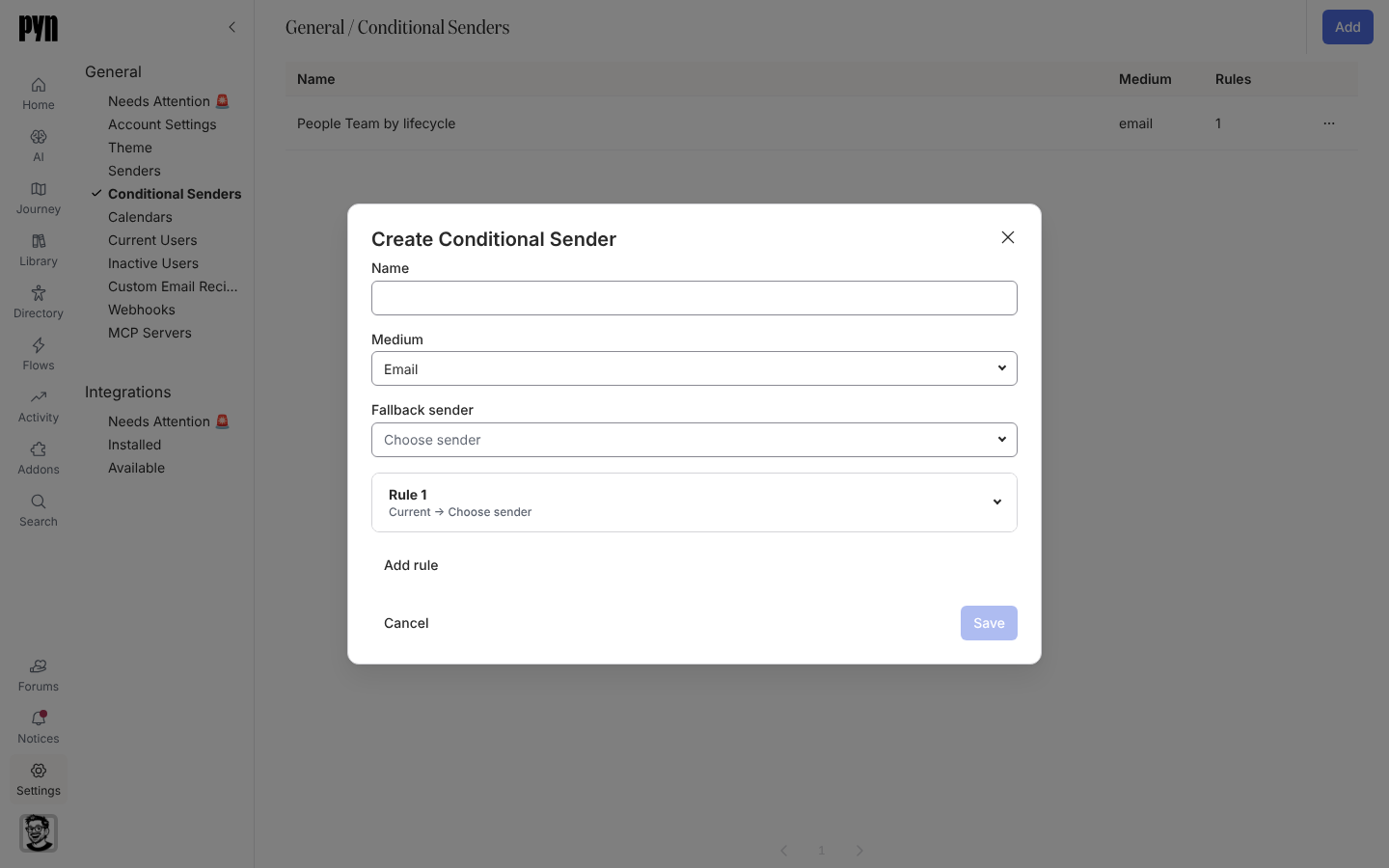
The Create Conditional Sender dialog with Name, Medium, Fallback sender and a first rule.
Create Conditional Sender: a name, a medium, a fallback and ordered rules.

People can now sign in to Pyn with their work email through your company’s single sign-on. On the sign-in page they choose Continue with SSO, enter their work email, and Pyn hands them to your identity provider. Sign in with SSO

A step no longer has to come from one fixed sender. A conditional sender checks ordered audience rules to pick who each message comes from, with a fallback sender for everyone the rules miss: people in Sales can hear from the head of Sales, and everyone else from the People team. Create one in Settings, then choose it as the sender on any step. Create a conditional sender

  • Duplicate a campaign step for a new date, and choose whether the copy keeps its recipients.
  • Put an enrollment’s Reference Date into flow emails and Slack messages.
  • Automation steps warn you when their audience is empty, or when a message scheduled before the start date leaves out upcoming joiners.
Fixes and improvements 39
  • You can now find items by typing part of a word in search, including Find on journey maps and Flows.
  • You can now access actions directly from rows in the Custom Email Recipients and Calendars tables.
  • Connected calendars now show the same active-status indicator as senders.
  • Every field in the Details panel now has an icon to help you identify its type.
  • You can archive and restore senders from the All senders table, with confirmation before archiving.
  • Employee search now shows personal email addresses when work addresses are missing and keeps each person’s employment stage visible alongside their name.
  • Enrollment lists now show the employee and enrollment status so you can distinguish entries at a glance.
  • Enrollment step lists now show personalized message text when a step has a single available message delivery.
  • You can change a campaign’s emoji and background colour together from its details panel.
  • HiBob can now provide more employment details, including original start date, tenure and manager status, when those fields are available.
  • The sign-in page now downloads less data before you sign in.
  • The current page number is now clearly highlighted when you browse lists.
  • Audience groups and automation triggers based on fields with multiple selections now match the chosen option instead of every employee with a value.
  • Enrollment steps now show whether messages were sent, bounced or skipped rather than appearing complete when no recipient was found.
  • Audience settings now have consistent spacing between included and excluded employees and the audience preview.
  • Manual enrollment now aligns option descriptions consistently and shows clear action buttons after enrollment.
  • The actions menu button in side-panel headers now matches the close button’s size.
  • Journey cards and categories now keep their updated order when you leave the page and return.
  • Reporting updates for your workspace no longer stall when another workspace encounters an error.
  • Scheduled activity in your workspace now continues when another workspace encounters an error.
  • The expanded message editor now stays at a readable width on wide screens.
  • Clicking the placeholder in a new campaign email now places the cursor where you can start typing.
  • Fields in campaign creation and other forms now have consistent spacing.
  • Date and scheduling dropdowns no longer turn grey when you move the pointer over them.
  • Automation steps now appear in schedule order rather than the order they were added.
  • Google Calendar invitations now use the next available occurrence from Google and respect the event’s time zone.
  • One invalid custom field no longer hides all the other custom fields on an employee profile.
  • The content editor’s Back button now returns you to the page you opened it from.
  • You can now reschedule campaign milestones and unsent messages by dropping them anywhere in a day on the month calendar.
  • The campaign year calendar now fits shorter laptop screens without cutting off the final months when there is enough room.
  • The campaign list now follows the month or year shown in the calendar.
  • Date-based flows now use the adjusted reference date when scheduling messages around an anniversary or other shifted date.
  • Reconnecting Workday with valid credentials now clears the error state and resumes syncing.
  • Duplicate and Archive actions now appear consistently in campaign menus.
  • Rapidly rearranging journey cards no longer causes their order to change unexpectedly after you drop them.
  • Journey cards now recover correctly from failed moves and stay hidden while archiving is in progress.
  • Editing details in the side panel no longer loses focus or resets your typed text during unrelated updates.
  • Employee syncing from Classic no longer fails when a custom choice field contains a true-or-false option.
  • ADP workers without a work or personal email address no longer create new employee profiles until an email becomes available.

Release notes: 25 September 2026 and 26 September 2026.