

HiBob
HiBob 集成从 Bob 的 API 读取人员并让 Directory 保持最新:姓名、工作和私人邮箱、入职和离职日期、试用期结束日期、部门、职位、站点、经理、HRBP,以及(如果你有相应的自定义字段)伙伴。Pyn 只读取;绝不写入 Bob。
- 你是 Pyn 中的管理员或所有者。
- 选择连接方式。Connect with HiBob 让你登录 Bob 并授权 Pyn。Use a service user instead 使用 Bob 管理员在 Settings > Integrations > Service Users 下创建的 Bob Service User ID 和 API Token。
- 为服务用户或你自己的账户授予对持有 Pyn 所读取字段的 Bob 类别的查看权限:About、Address(城市、国家和邮政编码)、Basic Info、Employment、Home(私人邮箱)、Jobs、Lifecycle、Payroll > Employment(合同)、Personal(短生日)和 Personal Contact Details,范围包括待入职者和离职员工在内的员工。
-
在 Pyn 中,打开左侧导航中的 Settings,然后打开 Integrations 下的 Available。
-
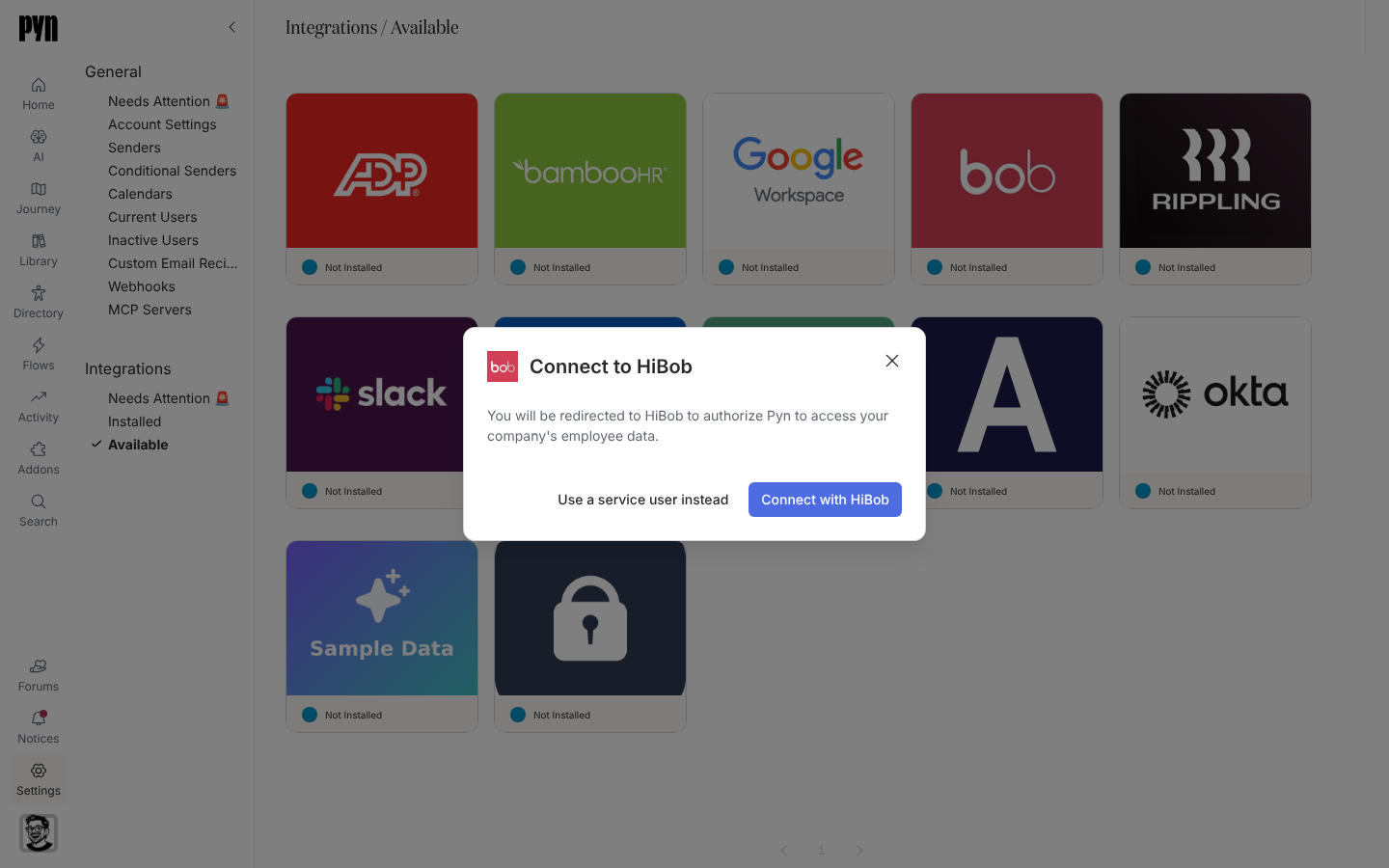
选择 HiBob 磁贴。Connect to HiBob 对话框打开:“You will be redirected to HiBob to authorize Pyn to access your company’s employee data.”
-
要登录,选择 Connect with HiBob,在 Bob 中授权 Pyn 并返回。
-
要改用服务用户,选择 Use a service user instead,粘贴 Service User ID 和 API Token,然后选择 Connect。对话框显示 “Validating those credentials…”
-
成功后,通知显示 “Your HiBob integration has been added to Pyn. It will take a minute or two for employee data to be pulled from HiBob.”
对话框可能显示的错误:“Could not verify the credentials — the service user ID or token appears to be invalid.” / “The credentials are valid but the service user lacks the permissions needed to read employees. Grant the service user people-read access in Bob.” / “An unexpected error occurred. Please check the credentials and try again. If the error persists, contact support.” 当 Pyn 无法开始登录时,Connect with HiBob 显示的也是最后一条。
Pyn 大约每小时从 Bob 刷新一次,并把每次运行记录在 History 下。Advanced 标签页列出 Fields in Report:你的租户返回的 Bob 字段 id 以及针对多少人,在断定某个字段不可用之前应先看这里。
| Pyn 属性 | 来自 Bob |
|---|---|
| 显示名称、法定姓名 | 显示名称,或名和姓 |
| 工作邮箱、个人邮箱 | 邮箱和私人邮箱 |
| 入职日期、司龄起算日期 | 入职日期;司龄起算日期来自原始入职日期,否则为入职日期 |
| 离职日期、试用期结束日期 | 内部离职日期和试用期结束日期 |
| 部门、职位、地点 | 工作部门、职位和站点(回退到地址中的城市) |
| 经理 | Reports-to,按 Bob id 或公司内员工 id 匹配 |
| HRBP | employee.hrbp 字段 |
| 伙伴 | 集成上指定为伙伴字段的自定义字段,与 Pyn 支持一起设置 |
| 生日、国家、邮政编码、时区 | 短生日和地址;时区由国家和邮政编码推算 |
| 合同类型、工作办公室和其他自定义列 | 映射到 Bob 字段 id 的工作区扩展字段 |
每个属性背后的 Bob 字段 id 以及缺少某个属性时该检查什么,见 HiBob 字段映射;字段矩阵见 HRIS 字段。
在 Installed 下打开 HiBob 磁贴,在 History 中检查是否有一次成功的刷新,然后打开员工并确认入职日期、职位和经理。
重新连接或断开连接
Section titled “重新连接或断开连接”- Reconnect 打开 Reconnect to HiBob,提供同样的两种选择。在 Bob 中轮换服务用户令牌后,把新的 API Token 粘贴到这里。“Your HiBob integration has been updated.” 表示成功。
- Deactivate 停止同步;Activate 恢复同步。
Webhook
Section titled “Webhook”在启用了 HiBob webhook 的工作区中,已安装的 HiBob 面板有一个 Webhook 标签页,这样 Bob 可以在员工变更发生时立即告诉 Pyn。你在 Bob 中用 Pyn 给你的地址创建 webhook,再把 Bob 的签名密钥粘贴回来。
-
在 Installed 下打开 HiBob 磁贴并选择 Webhook 标签页。提示显示 “Have HiBob tell Pyn about employee changes as they happen, rather than waiting for the next sync.” 选择 Set Up Webhook。
-
标签页现在显示要推送到的地址,并带有 Copy URL。在 Bob 的 webhook 设置中,创建一个推送到该 URL 的 webhook。
-
让它订阅员工事件(created、updated、joined 和 left),使用 v2 载荷。
-
把 Bob 为该 webhook 显示的签名密钥粘贴到 Signing Secret 中并选择 Save。在此之前,提示显示 “This webhook accepts nothing until it has HiBob’s signing secret.”
保存密钥后,提示显示 “Pyn holds this webhook’s signing secret, and accepts what HiBob signs with it.”,后面是 Last received 和最近一次投递的时间,或者 Nothing received yet。密钥不会再次显示;要轮换它,把新密钥粘贴到 Replace Signing Secret 中并选择 Save。Pyn 会把它接受的每次投递在 History 下记录一次,记为 Webhook Processed(例如 “Received employee.updated for employee 123”)或 Invalid Webhook Payload。到达 Directory 的内容仍然来自刷新。指向已在 Directory 中的员工的投递,还会触发所有触发器为该事件类型的 HiBob Webhook 的已发布自动化流程;见触发器目录。Pyn 会拒绝验证失败或在集成停用期间到达的投递。在期待 Last received 变化之前,先让连接后的第一次刷新完成。
| 你看到的 | 含义 |
|---|---|
| History:“Error: Authentication failed, please reconnect” | 令牌已轮换或登录已被撤销。重新连接。 |
| History:“Error: Insufficient HiBob permissions” | 服务用户失去了人员读取权限或某个字段组。在 Bob 中扩大它的权限。 |
| 缺少人员或字段 | 检查 Advanced 下的 Fields in Report;那里没有的字段对服务用户不可见,或者你的租户没有它。 |
| 离职员工仍然在职 | 授予对前员工的生命周期访问权限,以便离职日期同步。 |
| History:Invalid Webhook Payload | Bob 推送了一条 Pyn 无法读取的投递。检查 Bob 中的 webhook 是否以 v2 载荷订阅了员工事件。 |
| Webhook 的 Last received 一直停在 Nothing received yet | 签名密钥缺失或错误、Bob 中的 webhook 推送到了不同的 URL,或者连接后还没有运行过刷新。保存 Bob 显示的密钥,检查 URL,并在 History 中检查是否有已完成的刷新。 |
- 集成,查看目录。
- HiBob 字段映射,查看每个 Pyn 字段背后的 Bob 字段。
- HRIS 字段,查看字段矩阵。
- 同步频率与匹配,了解计划和匹配。
- 员工,检查已同步的记录。