

Greenhouse
Greenhouse 集成读取申请状态为已录用且有 offer 的候选人,并把他们创建为即将入职的员工,入职日期取自最近一份带有入职日期的 offer,同时带上招聘经理和你映射的自定义字段。入职前流程就能在他们的工作账户存在之前联系到他们。
- 你是 Pyn 中的管理员或所有者。
- 一位 Greenhouse 管理员为 Pyn 创建带有 Harvest 读取权限范围的 OAuth 凭据,并把 Client ID 和 Client Secret 交给你。连接需要 OAuth 凭据;Harvest API 密钥无法通过验证。
-
在 Pyn 中,打开左侧导航中的 Settings,然后打开 Integrations 下的 Available。
-
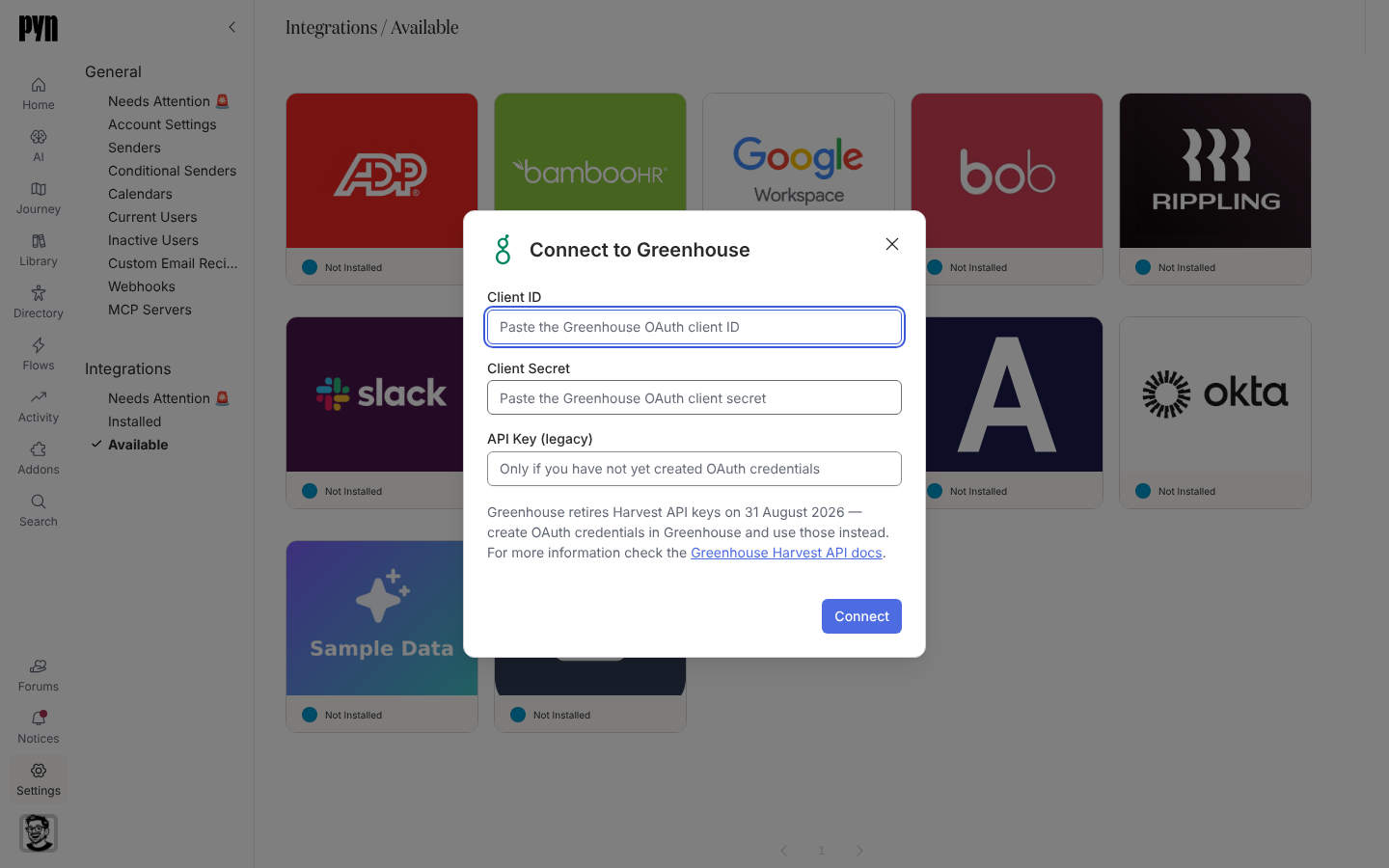
选择 Greenhouse 磁贴。Connect to Greenhouse 对话框打开。
-
粘贴 Client ID 和 Client Secret,并把 API Key (legacy) 留空;对话框显示“Greenhouse retired Harvest API keys on 31 August 2026 — a connection needs OAuth credentials created in Greenhouse.”
-
选择 Connect。Pyn 检查凭据时,对话框显示 “Validating those credentials…”
-
成功后,通知显示 “Your Greenhouse integration has been added to Pyn. It will take a minute or two for candidate data to be pulled from Greenhouse.”
对话框可能显示的错误:“Could not verify those credentials — they appear to be invalid or expired.” / “The credentials are valid but lack the permissions needed. Grant the required scopes and try again.” / “Enter either a client ID and secret, or a Harvest API key.” / “An unexpected error occurred. Please check the credentials and try again. If the error persists, contact support.”
Pyn 大约每小时从 Greenhouse 刷新一次。
| Pyn 属性 | 来自 Greenhouse |
|---|---|
| 显示名称、法定姓名、常用名 | 名、姓和常用名 |
| 工作邮箱 | 候选人类型为 work 的邮箱;绝不从其他类型推断 |
| 个人邮箱 | 个人邮箱,或任何非工作地址 |
| 入职日期 | 最近一份带有入职日期的 offer |
| 地点 | offer 的地点自定义字段 |
| 经理 | 招聘经理,一位 Greenhouse 用户 |
| 时区 | 候选人的时区 |
| 自定义字段 | 映射到 Greenhouse 自定义字段名称键的工作区扩展字段 |
录用者在 Directory 中显示为 Upcoming。关于 ATS 记录如何与随后到来的 HRIS 记录合并,见同步频率与匹配。
第一次刷新后,打开员工并选择 Upcoming 视图。集成的 History 标签页列出每次刷新及其结果。
重新连接或断开连接
Section titled “重新连接或断开连接”- Reconnect 打开 Reconnect to Greenhouse 以输入新凭据。“Your Greenhouse integration has been updated.” 表示成功。
- Deactivate 暂停同步;Activate 恢复同步。
| 你看到的 | 含义 |
|---|---|
| History:“Error: Authentication failed, please reconnect” | 凭据已被撤销或密钥已过期。使用 OAuth 凭据重新连接。 |
| 缺少某位录用者 | 该申请未标记为已录用,或没有 offer。offer 中没有入职日期的录用者会在没有入职日期的情况下创建,不会显示为 Upcoming。 |
| 工作邮箱为空 | Greenhouse 中该候选人没有类型为 work 的邮箱;Pyn 不会猜测。 |