

手动注册员工
手动注册把你选择的人直接放进自动化流程的已发布版本。它跳过触发器和受众,所以是在自己身上测试流程、补上触发器漏掉的人、运行一期培训班,或者按新日期重新运行一个序列的工具。
- 该自动化流程已发布。如果它有未发布的更改,Pyn 会警告“This automation has unpublished changes”并提供 Continue Anyway,它会按最新发布的版本注册。
- 该自动化流程不是 Inactive,也不使用 Form Submission 或 HiBob Webhook 触发器;这几种都不提供 Manual Enroll。
- 每个人按主要工作电子邮件匹配,并且必须是在职员工或即将入职者。休假中的人算作在职员工,会被注册。已离职员工会被跳过。
- 决定参考日期。每个步骤都相对于它排期,所以对入职流程它是入职日期,对培训流程它是课程开始的那天。
-
在 Pyn 中,打开左侧导航中的 Flows,然后打开 Automations,并选择该自动化流程。
-
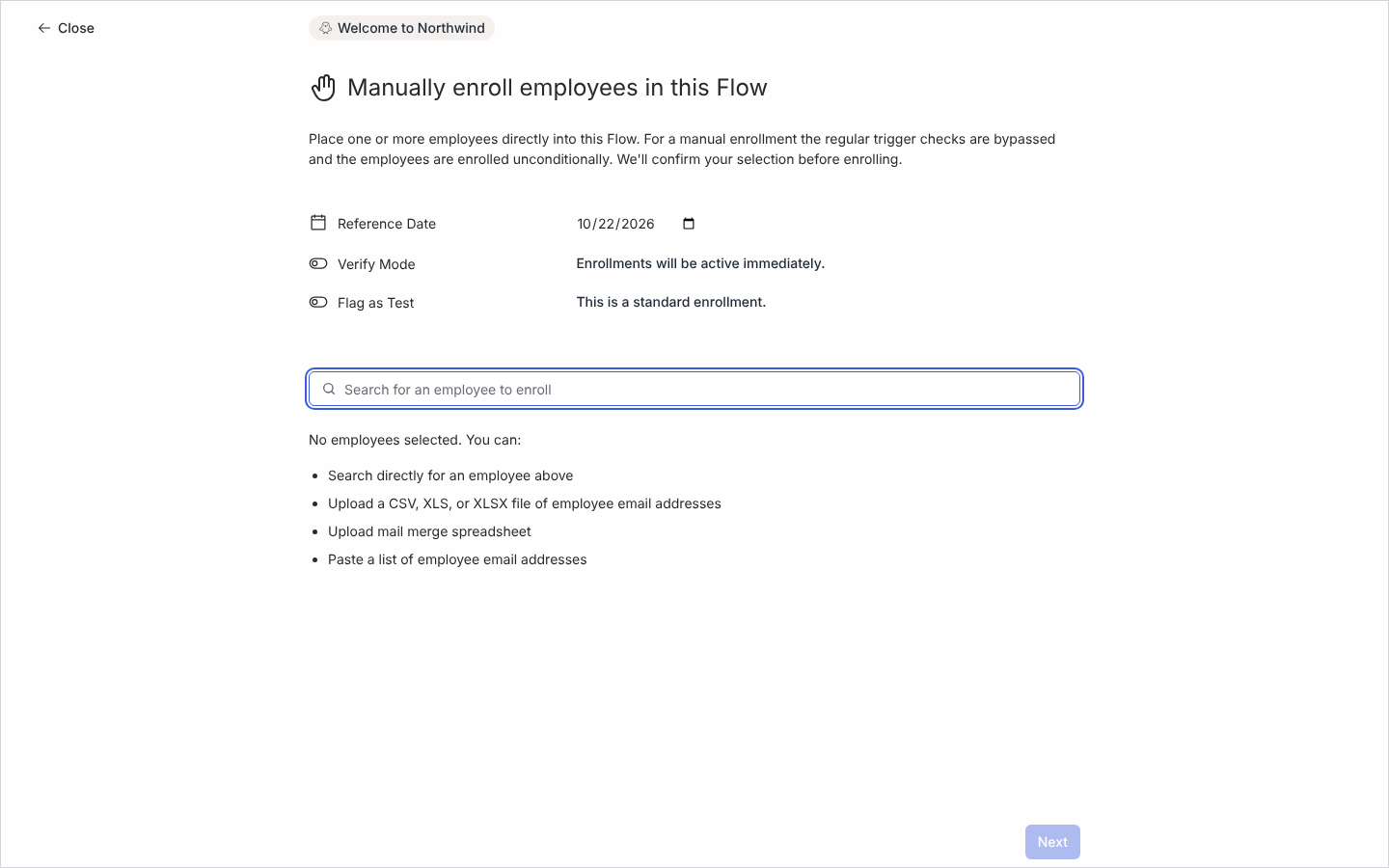
选择顶部的模式按钮(例如 Manual 或 Automated),然后选择 Manual Enroll。全页对话框 Manually enroll employees in this Flow 打开。
-
用以下任一方式添加人员:
- 在 Search for an employee to enroll 中输入姓名并选择每个匹配项。
- 选择 Paste a list of employee email addresses。在 Paste Email List 屏幕上,粘贴以逗号、空格或换行分隔的地址,然后选择 Process Emails。
- 选择 Upload a CSV, XLS, or XLSX file of employee email addresses,并选择一个每行一个地址的文件。
- 选择 Upload mail merge spreadsheet,上传带表头行和额外列的文件;见从电子表格注册。
一次最多可以粘贴或上传 1,000 个地址。匹配不到任何人的地址会被列出,方便你修正。
-
设置 Reference Date;它的初始值是今天的日期。通过搜索或粘贴添加的人总是使用这个日期。
-
开启 Verify Mode,以暂停状态创建注册(“Created enrollments will need verification to proceed.”),这样你可以在任何内容发送之前在 Needs Review 中审核每个人的步骤。关闭则为“Enrollments will be active immediately.”
-
注册你自己时开启 Flag as Test(“This is a test enrollment and is not included in metrics.”)。测试注册不计入 Enrollments 计数和 Dashboard。
-
选择 Next,检查 Confirm Manual Enrollments 下的名单,然后选择 Confirm。
你应该看到什么
Section titled “你应该看到什么”确认屏幕显示“Congratulations. Your enrollments are ready.”(一个人时为“Your enrollment is ready.”),带有按钮 Go back to the flow、View all enrollments in activity、Enroll more employees 和 Done。如果 Pyn 拒绝了任何人,一条警告会说明有多少条注册因为员工被修改、不在当前阶段或在过去五分钟内已注册到这个流程而被跳过,并把你指向 Activity 视图。在注册下,每个人都有一行,带有你的参考日期;使用了 Verify Mode 时,已暂停的行在 Needs Review 中等待。如果 Pyn 报告“There was an error enrolling. Check the activity page to confirm enrollment status, or reach out to support.”,请先打开 Enrollments 再重试,以免把任何人注册两次。
- 从电子表格注册,了解逐行参考日期和自定义令牌。
- 处理延迟注册,了解逾期步骤会怎样。
- 使用没有触发器的流程,了解只靠手动注册的流程。
- 注册,审核、取消暂停或停止你创建的内容。