

BambooHR
BambooHR 集成通过 BambooHR API 读取你的员工目录和一份自定义报表,所以入职日期、部门、经理和离职员工无需电子表格就能驱动你的流程。在启用了 BambooHR webhook 的工作区中,BambooHR 还会在两次刷新之间把变更通知 Pyn。
- 你是 Pyn 中的管理员或所有者。
- 你知道你的 BambooHR 公司域名:BambooHR 地址中
.bamboohr.com之前的部分。 - 你可以用一个有 API 访问权限、并能看到你想同步的字段的账户登录 BambooHR。非员工的服务账户比个人登录更好,因为个人登录会在那个人离职时失效。
-
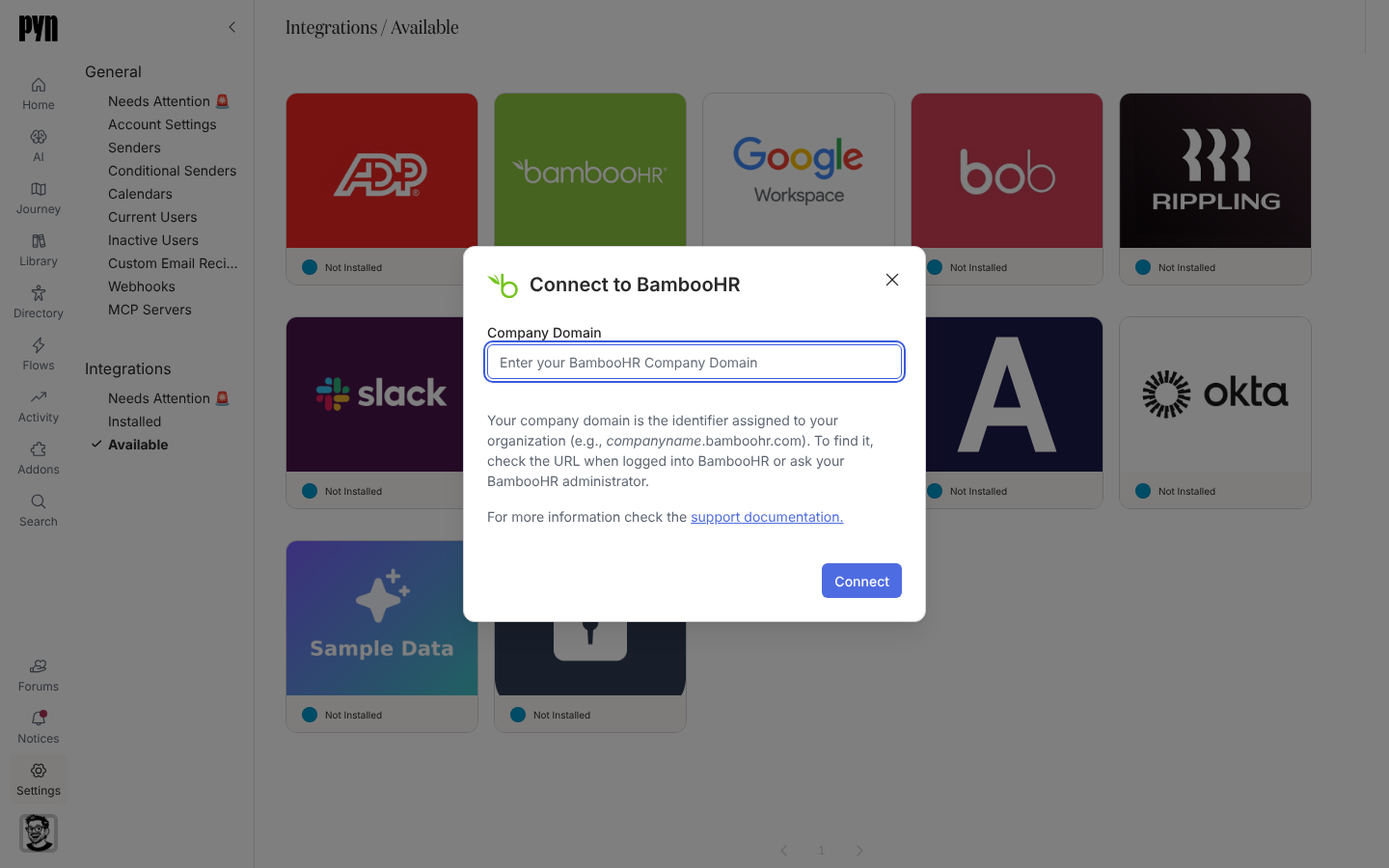
在 Pyn 中,打开左侧导航中的 Settings,然后打开 Integrations 下的 Available。
-
选择 BambooHR 磁贴。Connect to BambooHR 对话框打开。
-
输入你的 Company Domain。可以粘贴整个地址,例如
https://acme.bamboohr.com;Pyn 保留acme。“This is not a valid company domain.” 表示它看起来不像 BambooHR 子域名。 -
选择 Connect。BambooHR 打开;登录并选择 Allow Access。
-
BambooHR 把你带回 Pyn。面板显示 “You’re connected. Syncing can take a few minutes. Check the journey map then!” 如果你在 BambooHR 拒绝了访问,或在那里停留太久,你会回到 Installed,并看到一条标题为 BambooHR wasn’t connected 的提示说明原因:“You didn’t grant access, so nothing was connected.”或“The sign-in took too long, so nothing was connected. Try again.”
Pyn 大约每小时刷新一次;报表没有变化的运行会记录为 “Successfully integrated to BambooHR. No employee changes found”。在启用了 webhook 的工作区中,BambooHR 自己的变更通知到达时会记录在 History 下。Details 标签页显示 Subdomain、Primary Source(Custom Report 或 Directory)、Last Refresh 和 Last Successful Refresh;Advanced 标签页列出 Fields in Report,每个字段带有计数。
| Pyn 属性 | 来自 BambooHR |
|---|---|
| 显示名称、法定姓名、常用名 | 显示名称、全名和常用名 |
| 工作邮箱、个人邮箱 | 工作邮箱和家庭邮箱 |
| 入职日期 | 雇用日期;比它更早的原始雇用日期表示这是回聘员工 |
| 离职日期、状态 | 离职日期;Active 以外的雇用状态变为非在职 |
| 部门、分部、地点、职位 | 对应的 BambooHR 字段 |
| 雇用类型 | 雇用历史状态 |
| 经理 | 主管员工 id |
| 生日、国家、邮政编码、时区 | 生日和地址;时区来自国家和邮政编码 |
如果 Pyn 用来连接的账户只能读取目录,面板会警告:“This integration is pulling limited employee data from the BambooHR directory. To get a complete employee profile, have a BambooHR administrator reconnect this integration, or ask for expanded permissions.” 字段矩阵见 HRIS 字段。
打开 Installed 下的 BambooHR 磁贴,打开 … 菜单并选择 Test Connection。“Successfully tested the connection to BambooHR.” 表示成功;“An error occurred connecting to BambooHR. Please Reconnect or contact support if the issue persists.” 表示登录已失效。然后检查员工。
重新连接或断开连接
Section titled “重新连接或断开连接”- Reconnect 为同一个公司域名重复 BambooHR 登录。在所连接账户的密码更改或权限扩大之后使用它。
- Deactivate 停止同步;Activate 恢复同步。Archive 把集成从 Installed 中移除;已同步的员工保留。任一操作失败时,会弹出 Could not deactivate the integration 或 Could not archive the integration,并且什么都不会改变。
| 你看到的 | 含义 |
|---|---|
| History:“Error: Insufficient permissions to access BambooHR” | 所连接账户的访问级别失去了 API 或字段权限。在 BambooHR 中打开 Access Levels > Custom Levels,选择该级别,在 Access Level Settings 下允许 Settings > Company Field Settings,然后重新连接。 |
| History:“Error: Authentication failed, please reconnect” | 登录已过期或被撤销。重新连接。 |
| History:“Could not connect to BambooHR, please reconnect” | BambooHR 拒绝了连接。重新连接;如果重复出现,联系支持。 |
| History:“BambooHR returned data in an unexpected format”(琥珀色) | 一次刷新收到了 Pyn 无法读取的回复,通常是偶发的,所以集成保持活跃,下次刷新会再试。如果每次运行都出现,联系支持。 |
| 某人离职后员工不再更新 | 集成是用那个人的登录连接的。用非员工账户重新连接。 |
| 入职日期等字段为空 | 它们在 BambooHR 中为空,或者该账户看不到它们。检查 Advanced 下的字段计数。 |