

更改自动化流程的模式
模式决定触发器能否注册人员,以及他们的步骤是否无需审核就发送。新的自动化流程从 Manual 开始;常见的路径是先用 Verification 检查最初几条注册,然后切到 Automated。
- 更改模式需要 admin 或 owner 角色。
- 先发布。模式控制注册,但实际运行的步骤来自已发布的版本。处于 Automated 模式的未发布草稿会把人员注册到最新发布的版本。
-
在 Pyn 中,打开左侧导航中的 Flows,然后打开 Automations,并选择该自动化流程。
-
选择顶部的模式按钮(显示为 Automated、Verification 或 Manual),然后选择 Change Mode。未激活的自动化流程则显示 Use This;选择它。
-
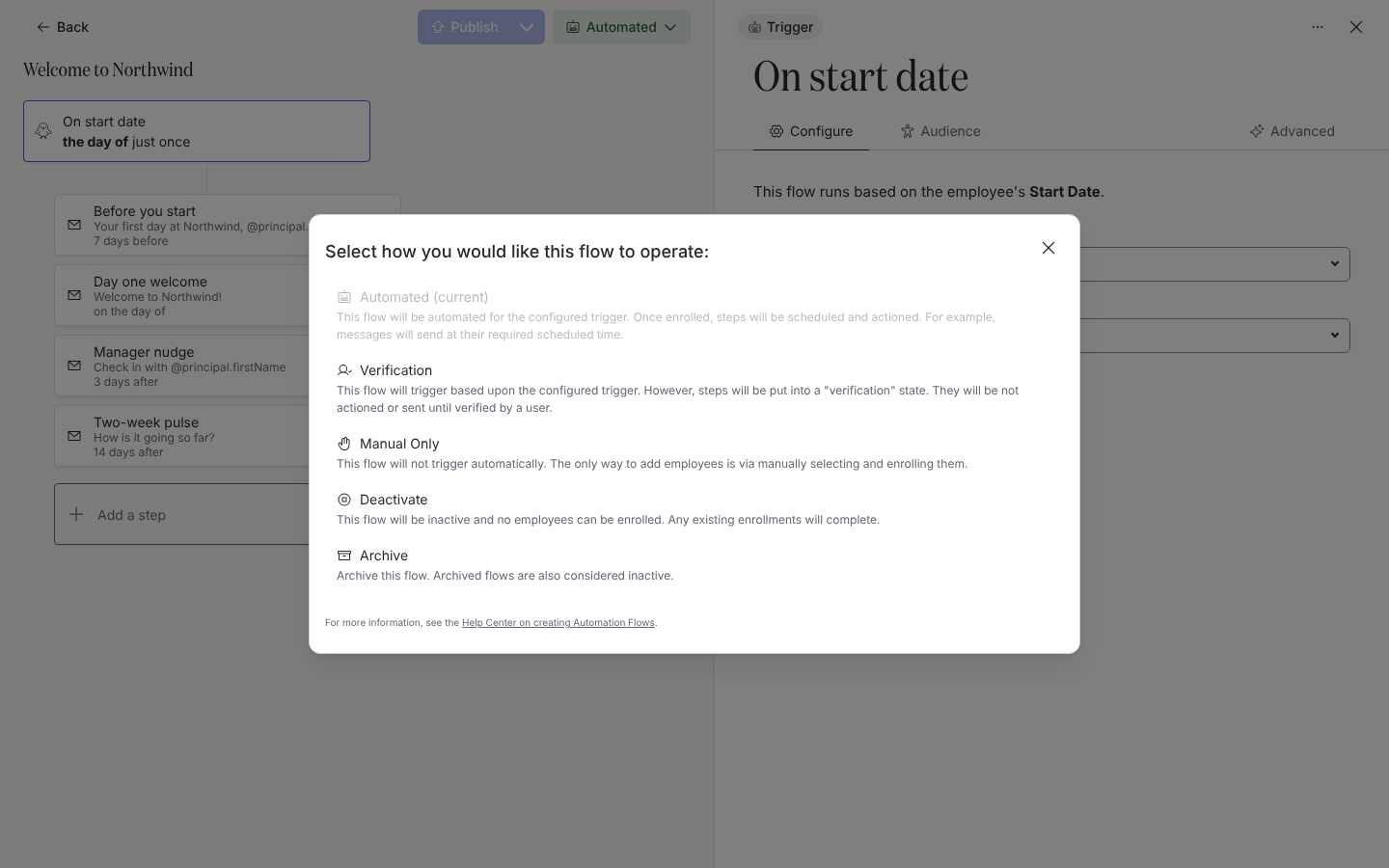
在 Select how you would like this flow to operate: 中选择:
- Automated:“This flow will be automated for the configured trigger. Once enrolled, steps will be scheduled and actioned. For example, messages will send at their required scheduled time.”
- Verification:“This flow will trigger based upon the configured trigger. However, steps will be put into a “verification” state. They will be not actioned or sent until verified by a user.”
- Manual Only:“This flow will not trigger automatically. The only way to add employees is via manually selecting and enrolling them.” 对 Form Submission 自动化流程显示为灰色。
- Deactivate:“This flow will be inactive and no employees can be enrolled. Any existing enrollments will complete.”
- Archive:“Archive this flow. Archived flows are also considered inactive.” 这里的 Archive 立即生效,没有确认。
-
对话框关闭,模式按钮更新。选择 Automated 会显示“Congrats! Your automation is fully automated.”
你应该看到什么
Section titled “你应该看到什么”Automations 表格中的 Status 标签与新模式一致(Verification 显示为 Verify)。在 Verification 下,新注册以暂停状态出现在 Needs Review 中。在 Automated 下,它们以待处理状态出现在 All Enrollments 下,步骤已排期。在 Inactive 下,不会出现新行,现有的行继续完成。
- 发布自动化流程,了解版本和更新注册。
- 自动化流程与注册状态,了解模式如何对应注册状态。
- 注册,审核并取消暂停。