

创建 webhook
有些答案已经存在于另一个系统中:LMS 中完成的培训、工单工具中的设备申请、一份签署的文件。表单上的 webhook 让那个系统把答案作为一次提交发送到 Pyn,记录在它指定的员工名下。
- 你是 Admin。
- 表单已构建并发布,字段标签是你的另一个系统能够映射的。见构建表单。
- 另一个系统能够发送每位员工在你 HRIS 中的 id,也就是 Pyn 从该集成获得的同一个 id。
-
在 Pyn 中,打开左侧导航中的 Flows,选择 Forms,然后选择表单。
-
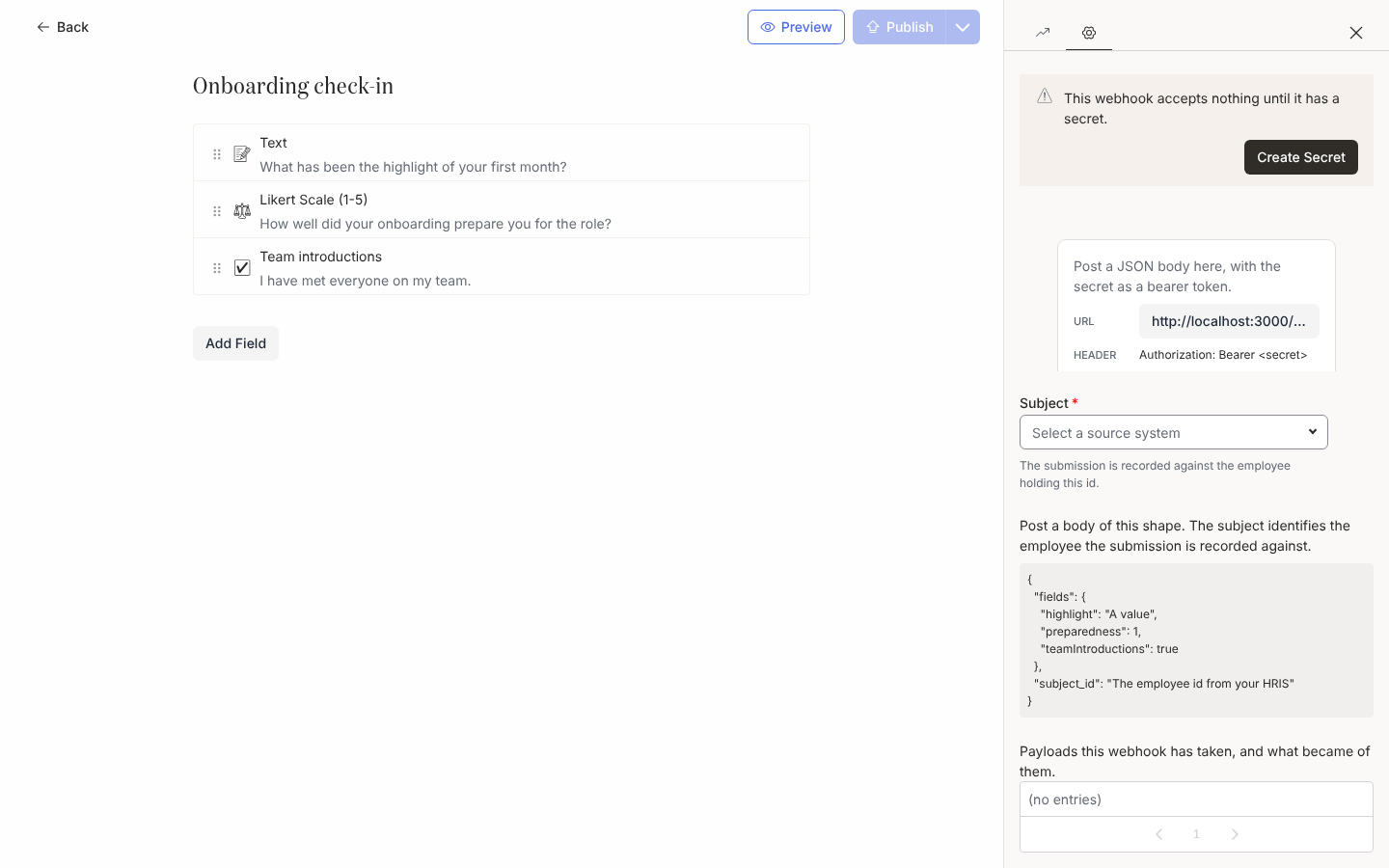
选择编辑器右侧栏上的 Settings。侧面板显示 Add a webhook to let another system submit this form on an employee’s behalf.。选择 Add Webhook。如果无法添加 webhook,会有一条提示显示 Could not add this webhook,侧面板保持原样。
-
在侧面板顶部,提示框显示 This webhook accepts nothing until it has a secret.。选择 Create Secret;提示框随后显示 Copy this secret now. It is shown once and cannot be retrieved later.。把它复制到另一个系统中,然后选择 Done。如果无法生成密钥,会有一条提示显示 Could not create the secret,提示框保持原样。已经有密钥的 webhook 显示 This webhook already has a secret. Replace it if the old one has been lost.,并改为提供 Replace Secret;见下文。
-
在提示框下方,复制 URL 并记下请求头:
Authorization: Bearer <secret>。 -
在 Subject 下,选择另一个系统将发送其 id 的来源系统,例如 BambooHR Employee ID 或 Workday Worker ID。说明文字是 The submission is recorded against the employee holding this id.。
-
阅读 Post a body of this shape. 下的示例。它用别名(驼峰形式的标签)命名每个字段并给出示例值,外加
subject_id。 -
从另一个系统发送一个测试负载,并阅读侧面板底部的日志(Payloads this webhook has taken, and what became of them.)。绿色条目显示 Recorded a submission for the … identifier …;红色条目说明问题所在。
轮换密钥和阅读日志
Section titled “轮换密钥和阅读日志”- Replace Secret 一步完成密钥轮换,旧密钥立即失效;确认之前先更新调用方系统。
- 日志显示最近的 20 条记录。一旦有了记录,它旁边的导出图标会把整个日志下载为
pyn-webhook-log.csv(receivedAt、outcome、action、code、message、eventId、subjectId、submissionId)。 - 被丢弃的负载还会在通知中生成一条通知,而且同一个错误反复出现只会保持一条通知而不是许多条;它的那一行提供 Acknowledge,然后是 Archive。工作区的通知设置决定是给每位 admin 发邮件还是只给 owner。
你应该看到什么
Section titled “你应该看到什么”被接受的负载作为提交出现在表单的 Activity 侧面板中,员工的记录带有任何 Buddy 或 Mentor 值。每位员工对每个 webhook 只能被提交一次;重复会被记录为 already-submitted。Webhook API 列出端点、请求头、请求体、响应和每一个日志代码。
- Webhook API,了解确切的请求和响应。
- 构建表单,了解负载填写的字段。
- 通知,了解失败在哪里显示。