

Shipping newsWeek of
Send a Slack message by email when someone is not in Slack
Deze inhoud is nog niet vertaald.
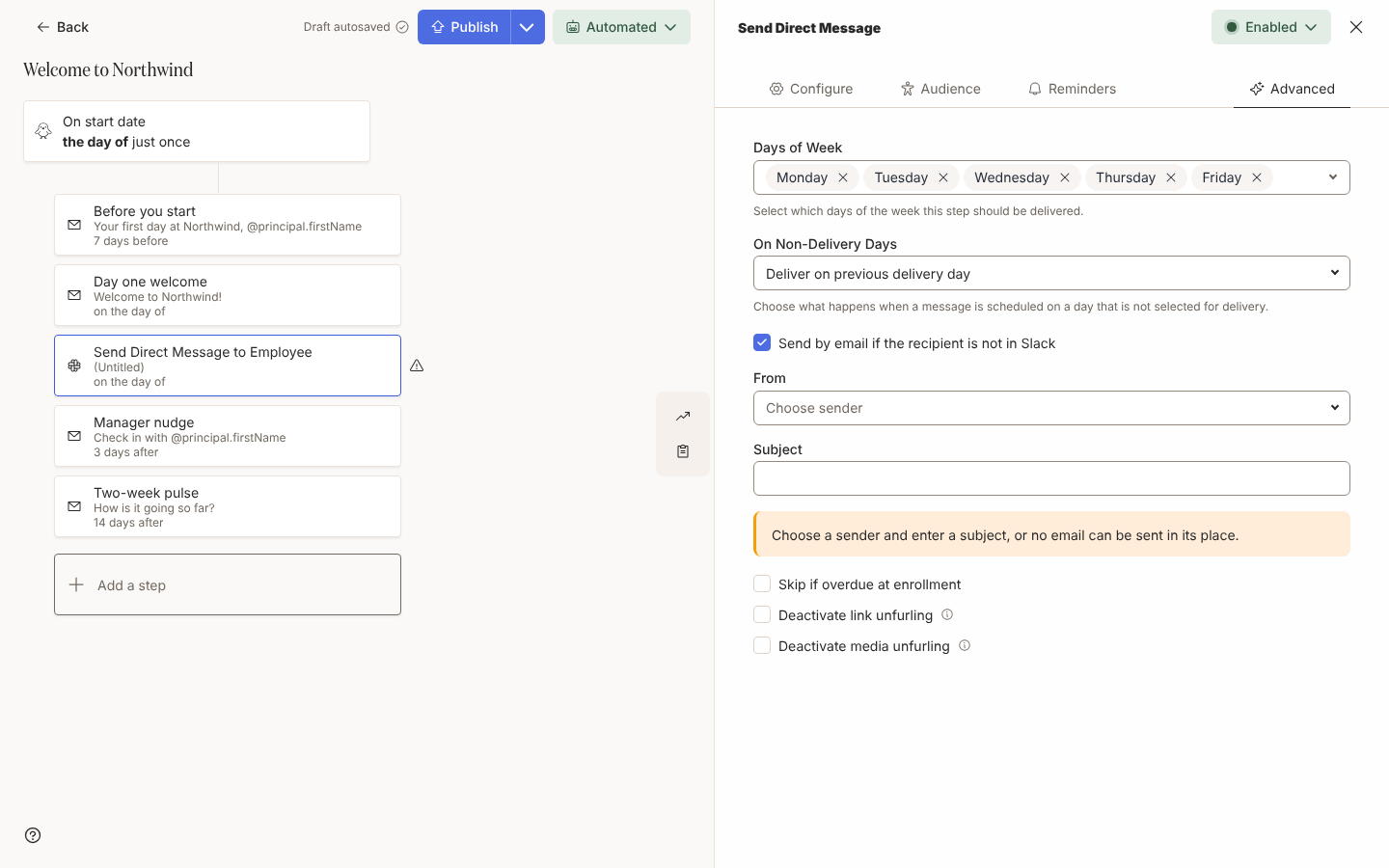
A Send Direct Message step can reach the people Slack cannot: a new starter whose Slack account is created on their first morning, or a contractor without a seat. On the step’s Advanced tab, tick Send by email if the recipient is not in Slack, choose the email sender under From and enter a Subject. Anyone who is not in your Slack workspace when the message is due gets the same message by email, and the bounced Slack message carries a View email link to the email sent in its place. The box is on automation steps and on draft campaign messages. Send a direct message by email when someone is not in Slack
Edit a static group
Section titled “Edit a static group”Admins can rename a static group and change who is in it. Edit on the group’s menu opens Edit Static Group with the name and the members filled in: remove a person with the X on their row, search for someone to add, or select Add from a CSV, XLS, or XLSX file or Add from a pasted list to add several people to the members already there. The same two links are on Add Static Group, so a second file or list adds to the people you have selected instead of replacing them. Create a static group
Groups for who has a Slack account
Section titled “Groups for who has a Slack account”A relationship group can follow who has a Slack account. In Create Employee Group, select Relationship, choose Slack account, then pick Employees with a Slack account or Employees without a Slack account. Use the group in an audience, or open it to see who still needs an account. Create a relationship group
Mark the people a team change trigger already applies to
Section titled “Mark the people a team change trigger already applies to”Buddy Assigned, Promoted to Manager, Change of Manager, Change of Location and Connected to Slack each have Backfill Existing in the … menu of the trigger drawer. Select it, then Backfill, and Pyn marks everyone the trigger already applies to as already triggered: nobody is enrolled and nothing is sent. On Promoted to Manager it marks anyone who has managed before. You can run it before or after you publish the automation. Configure a team change trigger
Filter groups that combine any kind of group
Section titled “Filter groups that combine any kind of group”A filter group’s Included and Excluded lists take lifecycle, relationship and static groups as well as demographic groups such as departments and countries. One saved group can now say “in Engineering, has a manager and is not on the pilot list”, and every automation can include it. Create a filter group
Also new
Section titled “Also new”- Add as many Cc recipients to a step as you need; the rows wrap onto further lines as the list grows. Choose recipients and Cc
- Find on All Messages matches a message by its text, its subject, the automation or campaign it belongs to and, for an automation message, the employee’s name or email address. Messages
- Archiving a campaign archives every one of its messages with it, and a message that has not been sent no longer sends. Campaign states
- Shipping news has a link to get each week’s post by email.
Fixes and improvements 25
- You can add people to a static group from a file or pasted list without clearing its current members.
- Filter groups can now include or exclude static, lifecycle and relationship groups alongside demographic groups.
- You can add more than three Cc recipients to a step, with the fields wrapping to fit the panel.
- Dutch, German, Spanish, Japanese and Simplified Chinese Help Centre guides now reflect recent changes and use clearer wording.
- Help Centre guides now explain group editing, message search, email fallback and trigger controls more clearly, with corrected guidance on calendars, Workday and people on leave.
- You can sign up for weekly Shipping news emails from the Help Centre’s Shipping news page.
- Translated Help Centre pages are now available for search engines to include in their results.
- A failed Slack channel invitation now correctly identifies a missing recipient instead of reporting a missing channel.
- New Classic migrations now preserve automation Cc recipients that name a specific employee.
- Microsoft 365 sender entries now show their avatar instead of an empty space.
- The Senders table now identifies Microsoft 365 senders that need reconnecting.
- Email previews and sent or scheduled campaign messages no longer appear as greyed-out fields.
- Find on All Messages can now match message text, subjects, flow names and the employee associated with an automation message.
- The Campaigns calendar now loads all campaigns and messages instead of leaving newer ones out of busy workspaces.
- Archiving a campaign now archives all its messages and stops its unsent messages from sending.
- New Classic migrations now preserve automation audience filters without incorrectly applying those groups to manager or buddy recipients.
- New Classic migrations now keep automatic link and media previews turned off on Slack steps.
- Saving Raw HTML in a campaign email no longer fails because the save is incorrectly blocked.
- A save blocked before it reaches Pyn no longer incorrectly says you lack permission to make changes.
- A conditional section’s edit dialog now opens when the section ends with an empty block.
- Creating a static group now asks for a missing group name when you select Next instead of leaving the button disabled without explanation.
- Enrollment and campaign panels now label the stopping time as Stopped At.
- Automations without a title now show (Untitled) in the Flows list instead of a blank row name.
- Home’s getting-started list now loads more efficiently in large workspaces.
- Audiences that include multiple groups copied from one Classic field or multiple Classic lifecycle groups now match people in any of those groups, as they did in Classic.
Release notes: 17 November 2026.